How to Get Equipment Back from a Terminated Employee: No Lasso Needed
Returning devices is more challenging in terms of effort while allowing employees to keep them puts data at risk. Is there an optimal solution? Let’s dive deeper and find out.



Returning devices is more challenging in terms of effort while allowing employees to keep them puts data at risk. Is there an optimal solution? Let’s dive deeper and find out.
While the practice of returning equipment from terminated employees is nothing new, the landscape has evolved significantly in recent times. Many enterprises have long had explicit policies determining whether employees must return equipment upon termination or if they are allowed to retain it. Such policies are underscored by formal acknowledgments and agreements employees make before their employment. However, following the COVID-19 pandemic, as many more people have started working remotely, old solutions have ceased functioning.
The scale of the problem is easy to underestimate. In a Capterra survey of nearly 300 HR professionals who manage offboarding, 71% said at least one departing employee failed to return company-owned equipment such as a laptop or smartphone, and hybrid and remote workers were 17% more likely to keep devices than their on-site colleagues. Each such employee walks away with close to $2,000 worth of hardware on average. “HR departments aren’t taking offboarding as seriously as they should,” says Brian Westfall, principal HR analyst at Capterra.
Returning equipment from a remote employee can pose operational challenges when a well-established workflow is absent. In cases where the parting is less than amicable, former employees may be uncooperative, making the retrieval process even more intricate.
And the remote setup that created this challenge is not going away. Gallup’s 2025 tracking shows that roughly 8 in 10 remote-capable US employees now work hybrid or fully remote, which means most corporate laptops live in home offices rather than in server rooms. Add about 5 million job separations that the US Bureau of Labor Statistics records every month, and equipment retrieval stops being an occasional annoyance and becomes a routine process that needs an owner, a deadline, and a paper trail.
Terminating a remote employee raises critical questions about data security and equipment recovery. How can an organization safeguard the data linked to these devices? How do you get equipment back from terminated employees even if they fail to deliver it? This article delves into these pressing concerns and offers practical solutions.
Terminating a remote employee presents a challenge that ultimately revolves around two options:
Each of these options carries its own set of advantages and limitations. In the following sections, we’ll look at each option, helping you determine the most suitable course of action for your organization.
The cost of not deciding shows up in inventory data. In a 2022 YouGov survey of IT leaders commissioned by Oomnitza, 27% of enterprises reported losing more than 10% of their technology assets during offboarding, and 42% traced unauthorized access to SaaS applications and cloud resources back to deprovisioning that was never finished.
To facilitate equipment returns, companies commonly establish a workflow where the terminated employee gets an empty box with a return label shipped to them. The employee then has to drop off the equipment in this box at one of the shipper’s locations.
A box alone rarely does the job, though. Andrea Arena of TimeSquared Concierge, a company that runs a dedicated equipment-retrieval service, reports that businesses relying on mailed prepaid boxes and patience get back less than 40% of their devices.
HR and IT specialists going for this option and wanting it to run smoothly should consider these best practices for returning remote employee equipment:
As of 2025-2026, US market rates for such services run about $80-200 per device including logistics, certified data erasure adds another $20-40 when it is not bundled, and typical door-to-door turnaround is 4-7 days.
Some benefits of this option compared to writing off the devices include:
Limitations:
Some companies prefer to let the employee keep the device while remotely wiping all the vulnerable data and disconnecting the user from corporate accounts.
Benefits:
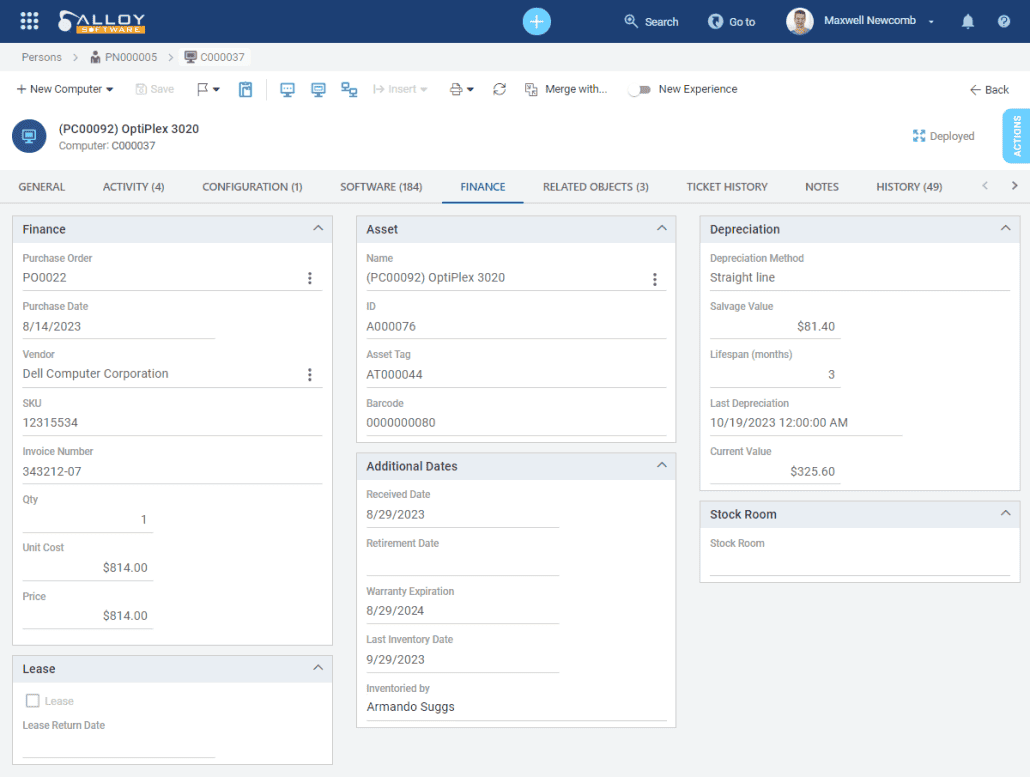
With Alloy Software’s IT asset management solution, you can quickly compare the purchase price and the current value of any organizational asset—see the screenshot below. Connect with our sales team to learn more.
Limitations:
Ivan Samoylov: “Wiping information remotely is not always simple. Moreover, when the wiping process is under the control of the company’s IT specialists, it becomes easier to standardize, thus reducing risks.”
thus reducing risks.”
Devices are only half of the exposure; accounts are the other half. In a July 2025 PasswordManager.com survey of 1,200 US employees, 40% admitted to using a former employer’s login credentials after leaving, 15% were still doing so, and 60% said they got in simply because the password had never been changed. Wing Security’s research points the same way: 1 in 5 organizations found that offboarded employees were never fully deprovisioned and potentially kept access rights to applications and data. “The shadow employee phenomenon is more common than many realise,” warns Anna Collard, SVP Content Strategy and Evangelist at KnowBe4 Africa, who notes that access management tends to concentrate on onboarding far more than on offboarding. Whichever option you choose, disabling accounts, sessions, and shared passwords on day one matters at least as much as the hardware itself.
Suppose you considered the benefits and limitations and chose the first option. You arranged the shipping and set up a procedure to make the return easy. What if the employee fails to return the devices nevertheless?
Some use scripts to turn the laptop into kiosk mode, where the only visible window displays instructions on how to return it, so the device becomes unusable for other purposes.
On forums and communities, the following option is discussed and considered by many as viable. If the employee doesn’t return the equipment within X days after the termination, its cost is deducted from the final paycheck. However, lawyers warn that in many states, the practice might be treated as a withholding from the employee’s final pay, which is unlawful, and advise not to go this way.
The Society for Human Resource Management is direct on this point: an employer cannot hold a terminated employee’s final paycheck until equipment is returned, and under the federal Fair Labor Standards Act final wages are generally due on schedule whether or not the laptop comes back. Some states allow limited deductions with written authorization; others prohibit them outright. Escalation, meanwhile, is common: in the same Capterra research, 61% of HR professionals who dealt with unreturned equipment said their employer threatened legal or criminal action. It rarely proves quick or cheap, which is why a documented return workflow beats recovery attempts every time.
Alloy Software is not a law firm; we are not giving legal advice. We suggest you consult a lawyer to adjust HR practices to your business requirements. However, we can help you by providing software streamlining the equipment return procedure!
Start your trial with Alloy Software today
With Alloy Navigator, a solution for IT service management and IT asset management, you can keep track of all company IT assets. Thanks to the so-called Configuration Management Database, you can access data associated with IT assets and see the connections between these assets and the relationships between people and assets.
Having exposure to these tools, your IT personnel are fully prepared for handling equipment returns.
You can see the IT assets connected with an employee and a summary of the asset information in their Person records.

By exploring the Asset record, you can access all the essential information about the asset. This includes:

Moreover, it’s not just about seeing the assets and the relationships between them in the interface of Alloy Navigator. Whether visible to the user or not, these relationships exist in the system, and you can use them to build custom workflows. For example, you can use this information as input in the offboarding workflow.
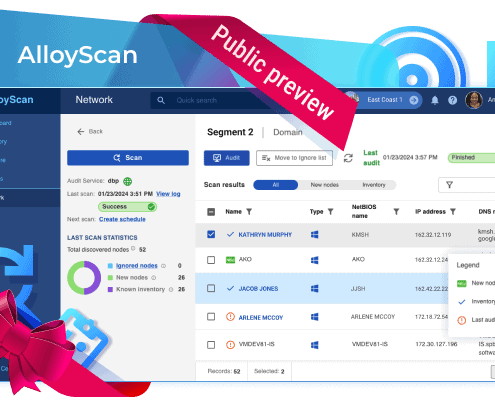
If part of your fleet lives outside the office, pair Alloy Navigator with AlloyScan, our cloud-based discovery platform. It keeps the inventory of laptops and other endpoints current automatically, so by the time the exit conversation happens, you already have the exact list of devices, with serial numbers, assigned to that person. The Equipment Checkout feature then closes the loop by recording what was issued, to whom, and when it is due back.

If you have any questions to the author, drop us a note! And subscribe to our social media accounts to get more content like this—we’re on LinkedIn, X (Twitter), YouTube, and Facebook.