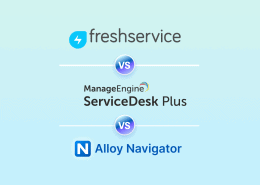
InvGate vs Freshservice vs Alloy Navigator: Which ITSM Platform Is The Best?
Freshservice vs Invgate: compare top ITSM platforms for your IT operations.


Freshservice vs Invgate: compare top ITSM platforms for your IT operations.
If you are comparing InvGate and Freshservice, you are probably looking for more than a place to log user requests for support.
Maybe your current help desk is too limited. Maybe your team needs a better self-service portal, cleaner workflows, stronger reporting, or a more modern ITSM experience. Or maybe the real problem is bigger: support tickets, assets, users, software, contracts, and lifecycle data are spread across too many tools.
That distinction matters.
Freshservice and InvGate are both known options in the ITSM market. The former is often considered by teams looking for a cloud-first service management platform. The latter is evaluated by teams that want service management with a strong usability and IT asset management angle.
But if the reason you are comparing them is that your service desk depends on accurate asset data, Alloy Navigator should also be on the shortlist.
Alloy Navigator is built for IT teams that need IT service management, IT asset management, discovery, CMDB relationships, operational management, and reporting connected into one operational platform.
| Platform | Best fit | Info |
| Freshservice | Teams that want a cloud-first ITSM platform with a modern IT support experience | See more |
| InvGate | Teams comparing ITSM and ITAM with usability and service visibility in mind | See more |
| Alloy Navigator | IT teams that need service desk, ITAM, discovery, business processess, CMDB, and reporting together | See more |
Many ITSM comparisons focus on the obvious features: request management, self-service, automation, SLA tracking, knowledge base, and reporting.
Those are important. But the real test often starts after all these essentials are ticked off the checklist.
Can the technician see the user’s assigned device? Can they check installed software, warranty status, service history, ownership, location, or related assets without leaving the request? Can the asset record show previous incidents, changes, contracts, and lifecycle status? Can managers report across both support activity and asset data?
If the answer is no, your team may be looking for a service solution without solving the operational problem behind the requests.
That is where the comparison changes.
Freshservice (FS), InvGate, and Alloy Navigator all belong in an ITSM evaluation, but they represent different paths. FS may appeal to teams that want a modern SaaS ITSM experience. InvGate may appeal to teams that want ITSM and ITAM presented in a highly approachable way. Alloy Navigator is strongest when ITSM and ITAM need to operate as one connected system.

Freshservice is often shortlisted by teams looking for a modern, cloud-first ITSM platform. It is commonly evaluated as a system to modernize support, self-service, automation, service catalog, and ITIL-aligned service management processes.
For many teams, that is exactly the requirement. If the priority is moving away from email-based support, improving request routing, introducing a cleaner service portal, and standardizing common IT service workflows, this solution may be a natural option to evaluate.
The main question is how far your needs go beyond service management.
If assets are already managed somewhere else, or if your asset requirements are relatively simple, this product may still fit the project. But if your team needs discovery, lifecycle management, software tracking, contracts, asset relationships, and service history to be deeply connected, you should validate whether the ITAM capabilities match your requirements and your specific plan.
In other words, Freshservice may be a strong fit when the service requests are the center of the project. If asset data is the center of the project, the evaluation should go deeper.

InvGate Service Management is often considered by teams that want IT service management with an emphasis on usability, visibility, and IT asset management. It may be especially relevant when the buyer does not want a heavyweight enterprise ITSM platform but still wants more than basic request management.
For teams comparing InvGate vs Freshservice, InvGate may stand out because of its ITAM-oriented positioning and its focus on making service management easier to adopt. That can matter for lean IT teams that need technicians to actually use the system consistently.
As with any comparison, the details matter. Teams should validate how InvGate handles discovery, lifecycle managements, CMDB relationships, approvals, reporting, deployment preferences, and integration with existing systems.
InvGate may be a good option when a team wants a more visual, approachable way to manage IT services and assets. But if the project requires a broader operational system where assets, requests, contracts, users, processess, software, and reporting are all tightly connected, Alloy Navigator deserves a closer look.
Alloy Navigator is designed for IT teams whose ITSM depends on accurate asset and operational data.
Instead of treating requests and assets as separate areas, Alloy connects IT service management with IT asset management, discovery, CMDB relationships, business processess, and reporting. That makes it especially relevant when technicians need to understand not only what the user is asking for, but also what device, software, location, service history, and lifecycle context sits behind the request.
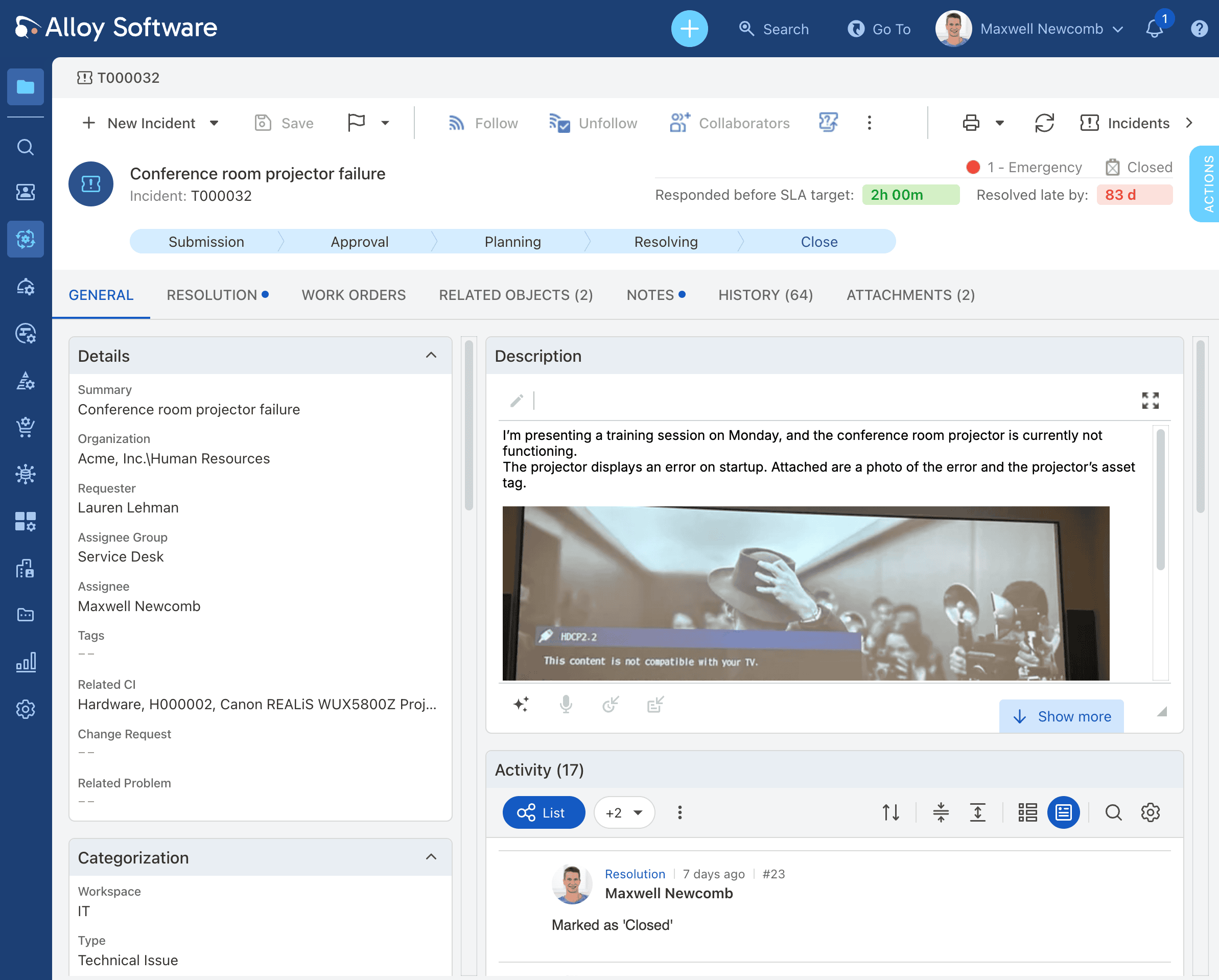
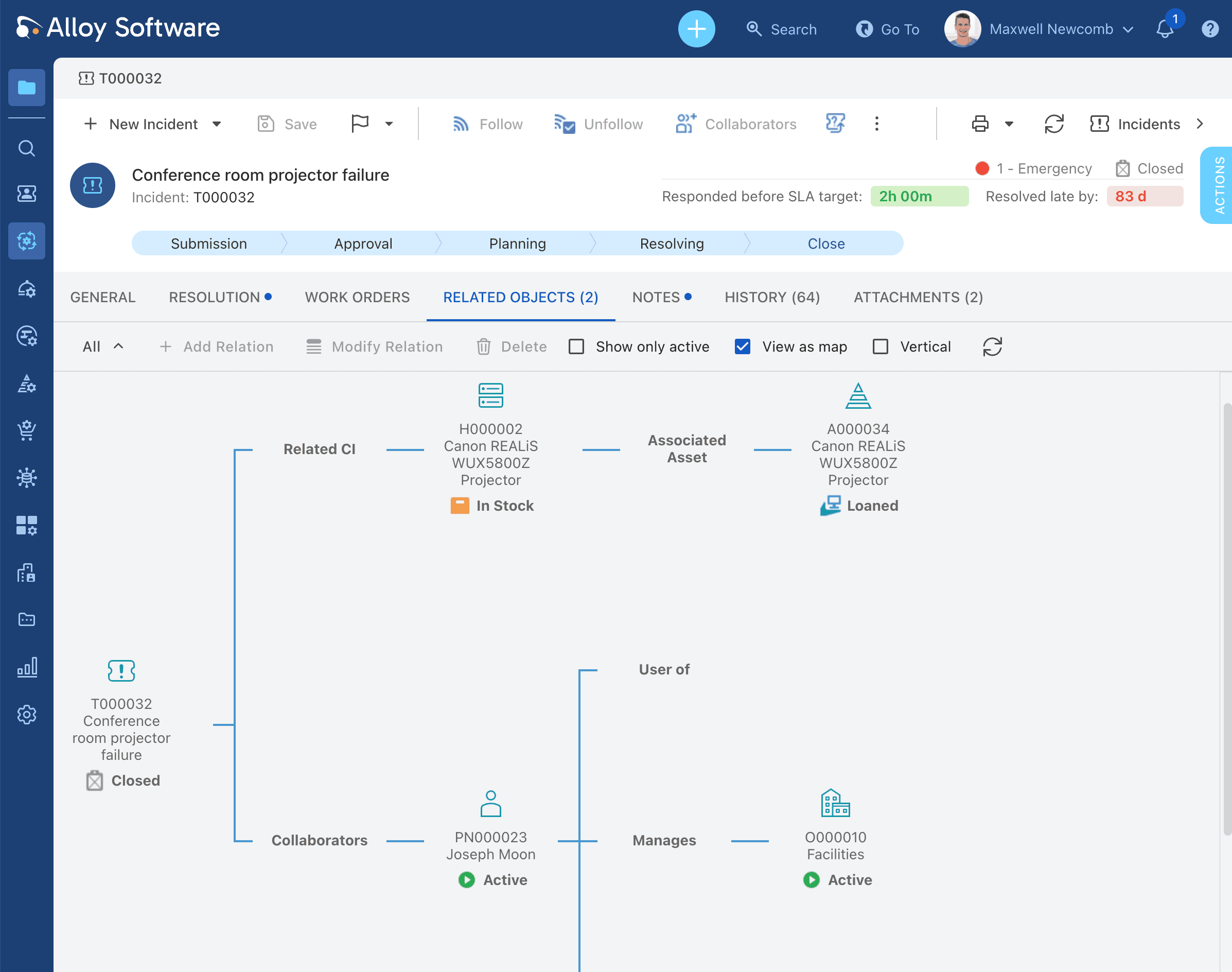
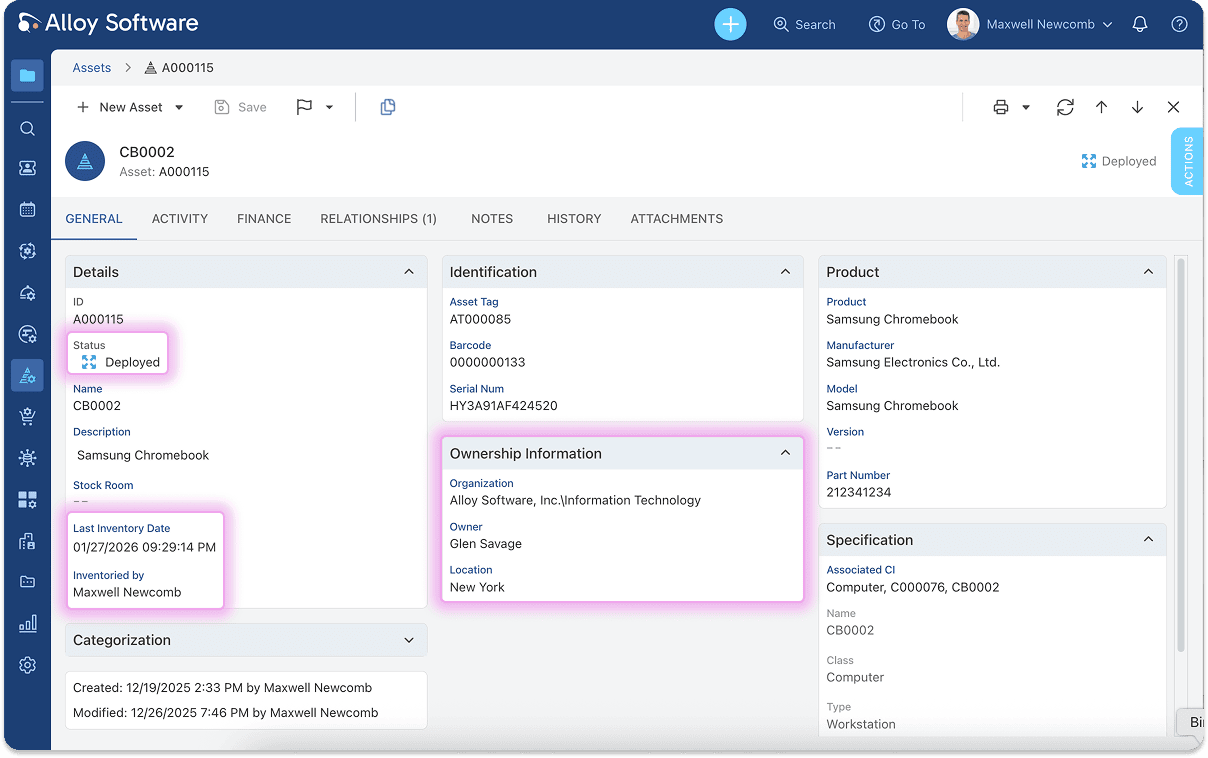
From a single incident record, technicians can see the asset, user, and related configuration data needed to resolve issues efficiently.
This is the difference between a help desk and an IT operations platform.
A help desk receives and routes tickets. An IT operations platform helps the team manage the environment that those tickets come from. That includes devices, users, software, contracts, purchase history, changes, approvals, and recurring issues.
Alloy Navigator is a stronger fit when:
For lean teams, Alloy Navigator Express can provide a practical ITAM plus service desk foundation. For more mature IT operations, Alloy Navigator Enterprise supports deeper workflows, approvals, change, service catalog, project management, CMDB, and ITIL-aligned processes.
| Category | Freshservice | InvGate | Alloy Navigator |
|---|---|---|---|
| Primary orientation | Cloud-first ITSM and service desk modernization | ITSM with asset-aware service management | Connected ITSM, ITAM, discovery, workflows, CMDB, and reporting |
| Best-fit buyer | Teams prioritizing modern SaaS ITSM | Teams comparing service management and asset management together | Teams whose service desk depends on asset and lifecycle context |
| Service desk | Strong area to evaluate | Strong area to evaluate | Core capability, especially when tied to assets and workflows |
| IT asset management | Validate depth by plan and requirements | Validate depth by requirements | Central part of the operating model |
| Discovery and inventory | Verify current scope | Verify current scope | Important part of asset visibility and lifecycle control |
| Asset context in tickets | Evaluate how much context agents get natively | Evaluate how asset data appears in service workflows | Built around connecting tickets to users, devices, software, contracts, and history |
| Workflow configurability | Good for common ITSM automation; verify complex needs | Evaluate against process complexity | Strong fit when approvals, change, lifecycle, and custom workflows matter |
| CMDB and relationships | Validate maturity for your use case | Validate maturity for your use case | Strong fit when relationships between users, devices, services, contracts, and tickets matter |
| Reporting | Validate dashboard and reporting flexibility | Validate reporting depth | Strong fit for service and asset reporting together |
| Main caution | May not solve deeper asset lifecycle needs alone | May require validation for deeper workflow and control needs | May be more than needed for basic ticketing-only buyers |
Freshservice may be the best fit if your main priority is cloud-first ITSM modernization.
It is worth evaluating when you want to improve ticket intake, standardize service workflows, launch a self-service portal, and give users a modern support experience. It may also fit teams that want SaaS-first deployment and do not have unusually deep asset lifecycle or discovery requirements.
Freshservice is especially relevant when your buying question is:
“How do we modernize the service desk quickly with a cloud ITSM platform?”
Before choosing it, validate how much ITAM, discovery, software tracking, and reporting depth you need now and how much you may need later.
InvGate may be the best fit if your team wants ITSM with a strong focus on usability and asset-aware service management.
It is worth evaluating when service visibility, adoption, and the connection between ITSM and ITAM are important, but you still want a system that feels approachable for the team.
InvGate is especially relevant when your buying question is:
“How do we manage IT services and assets in a way our team can adopt easily?”
Before choosing it, validate whether its workflow, discovery, reporting, CMDB, and lifecycle capabilities match the complexity of your environment.
Alloy Navigator may be the best fit if your real problem is not just ticketing. It is the connection between service work and the IT environment.
Choose Alloy when your technicians need to see the asset behind the ticket. Choose it when devices, users, software, contracts, lifecycle stages, and service history need to be part of the same operating picture. Choose it when reporting has to show not only how many tickets were closed, but also what those tickets reveal about your assets, workloads, risks, and recurring problems.
Alloy is especially relevant when your buying question is:
“How do we connect ITSM, ITAM, discovery, workflows, and reporting in one practical platform?”
It is also a strong fit for teams replacing spreadsheets, email, homegrown tools, lightweight help desks, or disconnected asset systems.
If Alloy Navigator sounds like the right fit, connect with us.
The hidden question: are you buying ticketing or IT operations?
A team can start an ITSM search by asking a simple question: “Which tool should we use for tickets?”
But that question is often too narrow.
If every request requires the technician to check which laptop the user has, what software is installed, whether the device is under warranty, whether the same issue happened before, or whether a replacement should trigger an approval workflow, then the team is not only buying ticketing.
It is buying operational control.
That is where many help desk tools start to feel limited. The tickets are there, but the context is somewhere else. Assets live in one tool. Software data lives in another. Contracts sit in spreadsheets. Approvals happen in email. Reporting requires manual cleanup.
In that environment, the service desk becomes a front door to a fragmented process.
Alloy Navigator is designed for teams that want to reduce that fragmentation. The value is not just that a ticket can be created. The value is that the ticket can be connected to the user, device, asset history, software, contract, workflow, and reportable business process behind it.
When comparing InvGate, Freshservice, and Alloy Navigator, do not compare only the visible license price.
A lower per-agent cost may not mean lower total cost if your team still needs separate tools for discovery, asset management, software license tracking, contract management, reporting, approvals, or lifecycle workflows.
A practical comparison should include:
If your team only needs ticket intake, a simpler tool may be enough. If you need service desk plus asset lifecycle, discovery, workflow control, and reporting, the comparison should reflect the cost of the full operating model.
It depends on your priorities. Freshservice may be a better fit for teams that want a cloud-first ITSM platform and modern service desk experience. InvGate may be a better fit for teams that prioritize usability and asset-aware service management. The right choice depends on whether your main need is ticketing, ITSM process maturity, ITAM, discovery, workflow control, or all of these together.
Because many teams comparing InvGate and Freshservice are not only buying a help desk. They are trying to connect IT support with assets, users, software, lifecycle data, approvals, and reporting. Alloy Navigator is relevant when ITSM and ITAM need to work together in one operational system.
Do not compare only by whether a platform has an “asset” feature. Compare how asset data connects to tickets, users, discovery, software, contracts, lifecycle workflows, reporting, and audit history. Alloy Navigator is strongest when asset context is central to service delivery.
A small IT team should avoid buying more complexity than it can implement. Freshservice may fit teams that want SaaS service desk simplicity. InvGate may fit teams that prioritize usability. Alloy Navigator Express may fit lean teams that need practical ITAM plus service desk and want room to expand into broader workflows over time.
Alloy may be more than you need if your team only wants basic ticket intake, has no asset management requirement, is shopping only for the cheapest per-agent help desk, or does not have anyone available to own implementation.
InvGate and Freshservice are both worth evaluating if you are modernizing IT service management. But the best choice depends on the actual problem you are solving.
If the problem is mainly a modern service desk, Freshservice may fit well. If the problem is approachable ITSM with an asset-management angle, InvGate may be a strong candidate. If the problem is that tickets, assets, users, software, contracts, workflows, and reporting are disconnected, Alloy Navigator should be part of the comparison.
The more your support process depends on asset context, the more important it becomes to evaluate ITSM and ITAM together.
Comparing InvGate and Freshservice? Add Alloy Navigator to your shortlist if your team needs service desk, asset management, discovery, workflows, CMDB, and reporting connected in one practical IT operations platform.
We’re trusted by IT teams in healthcare, public sector, manufacturing, and education across 50+ countries.
→ Book a 15-minute demo tailored to your team size and industry