Automated Ticket Routing: How It Works, Why It Matters, and How to Set It Up
Speed up IT support by automatically assigning requests to the right team.


Speed up IT support by automatically assigning requests to the right team.
Think of a receptionist at a small clinic: she answers the phone, checks patients in, and directs each person to the right doctor without missing a beat. Now put her in a 300-bed hospital with no triage system. At that scale, the model collapses under its own weight. Support teams hit the same wall.
At some point the math turns against you. It’s not just about the speed of your IT support processes. It’s also about the price. You’re paying someone a 5, if not 6 figure salary to do a job a routing rule could handle in seconds. And as volume grows, the only solution under a manual model is hiring another person to move tickets around. Then another.
Speed and money aren’t the only cost. The more agents touch the assignment process, the less consistent it becomes. One person routes a payroll question to HR. Another sends the same request to Finance. A third isn’t sure and leaves it in the general queue. Tickets start bouncing between teams, ownership blurs, and the SLA clock keeps running through every handoff.
In this article, we will break down how automated ticket routing can help you move faster and more consistently—at any volume, without manual intervention on each request.
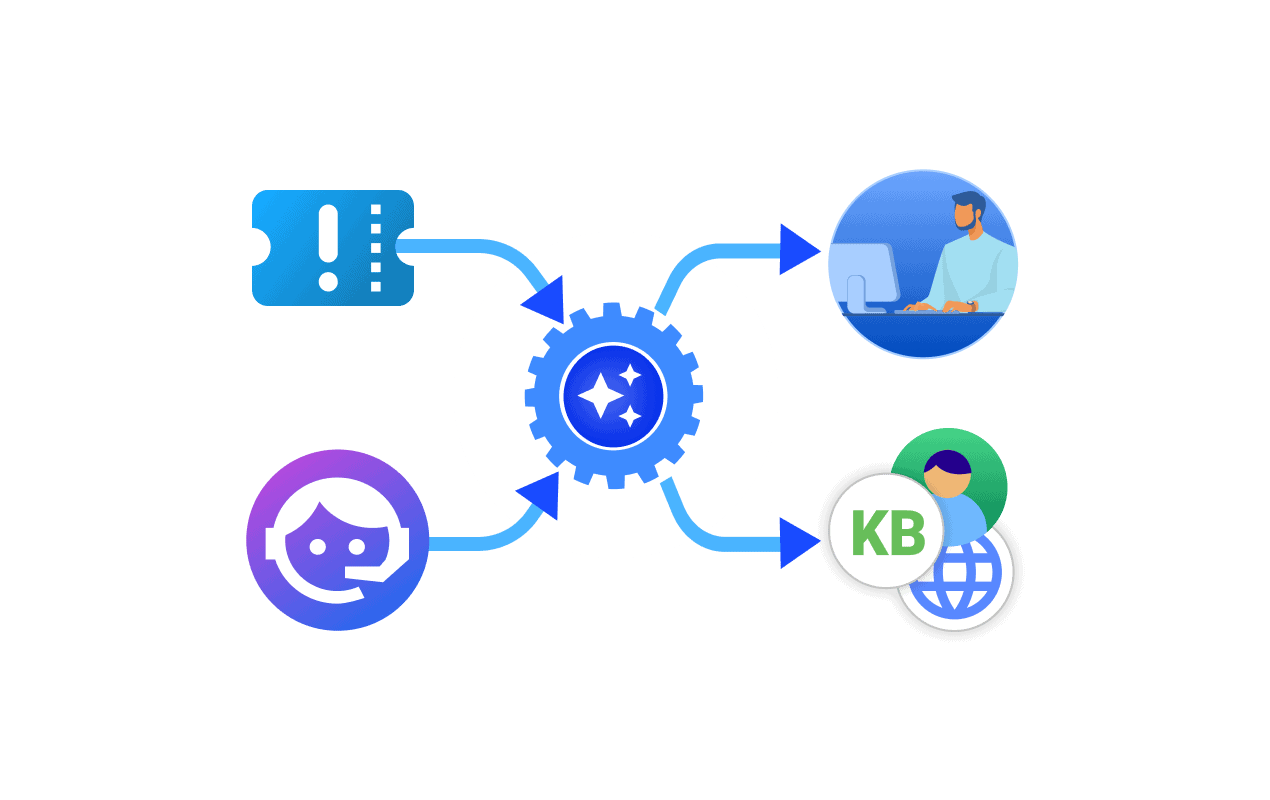
Automated ticket routing is the automatic assignment of incoming support tickets to the right team, queue, or agent—based on predefined rules, AI models, or a combination of both.
The destination can be a department, a technician group, a regional queue, or a specific agent. The assignment logic can draw on issue category, priority, language, requester type, customer tier, agent skill, or current workload.
In Alloy Navigator, automated ticket routing is handled through its workflow automation and business logic engine. The system can automatically route tickets based on predefined conditions such as ticket category, requester, requester location, related asset, priority, SLA status, or custom rules.
The scope is deliberately narrow: one assignment decision, made automatically, on every ticket that enters the system. Everything that happens before and after is a separate problem, and a separate layer.
Routing is often confused with triage, escalation, or workflow automation. They’re related, but they’re not the same—and conflating them is one of the most common reasons routing projects underdeliver.
A clean lifecycle looks like this:
Ticket submitted → Triage → Routing → Workflow automation → Escalation → Resolution
If teams try to fix routing before fixing triage, they’re optimizing the wrong step. If the system can’t reliably classify what a ticket is, it can’t route it reliably either.
Here’s what happens when a ticket enters an automated routing system:
Routing is one step in this chain, but the automation potential doesn’t stop at the assignment stage. Notifications, approvals, SLA escalations, and status updates can all run without manual input, turning a single routing decision into a fully automated service workflow. If you want to understand how far that can go, this one is a good next read: Help Desk Automation: What It Is and How to Use It →
Triage is a step where the most strategic mistakes are made without the team even noticing.
Routing logic is only as reliable as the data it reads. If tickets are miscategorized on intake, the system will send them to the wrong place—just faster and more consistently than a human would. Automation amplifies whatever process feeds it.
Before configuring routing rules, answer three questions honestly:
If any answer is “not quite,” fix the classification layer first. Routing rules built on inconsistent triage will drift—and when they fail, they fail silently.
The first routing rule most teams write looks something like: hardware issues go to IT, software issues go to the helpdesk. That works until the first edge case. Mature support environments read a much richer set of signals — and make better assignments because of it.
Here are some examples of routing inputs you could use:
| Routing input | What it helps decide | Typical use case |
| Category or issue type | Which team should receive the ticket | Access request, hardware issue, payroll issue |
| Priority, urgency, impact | Which tickets should go first | Critical incidents, executive issues |
| Requester department | Which support function owns it | IT, HR, Facilities, Finance |
| Asset or service affected | Which specialized team should handle it | Network, endpoint, application support |
| Language or time zone | Which regional team should respond | Global service organizations |
| Skill match | Which technician can resolve it fastest | Complex technical environments |
| Current workload | Who has capacity right now | High-volume queues |
| VIP or customer tier | Which service level to apply | Retention-sensitive accounts |
| SLA risk | Which tickets need intervention now | Tickets close to breach |
| Sentiment or intent | Which ambiguous tickets need special handling | AI-assisted support environments |
| Channel of origin | Which handling process applies | Email, chat, phone, portal |
Advanced routing inputs like the following are worth adding once you’re all set up with the basics:
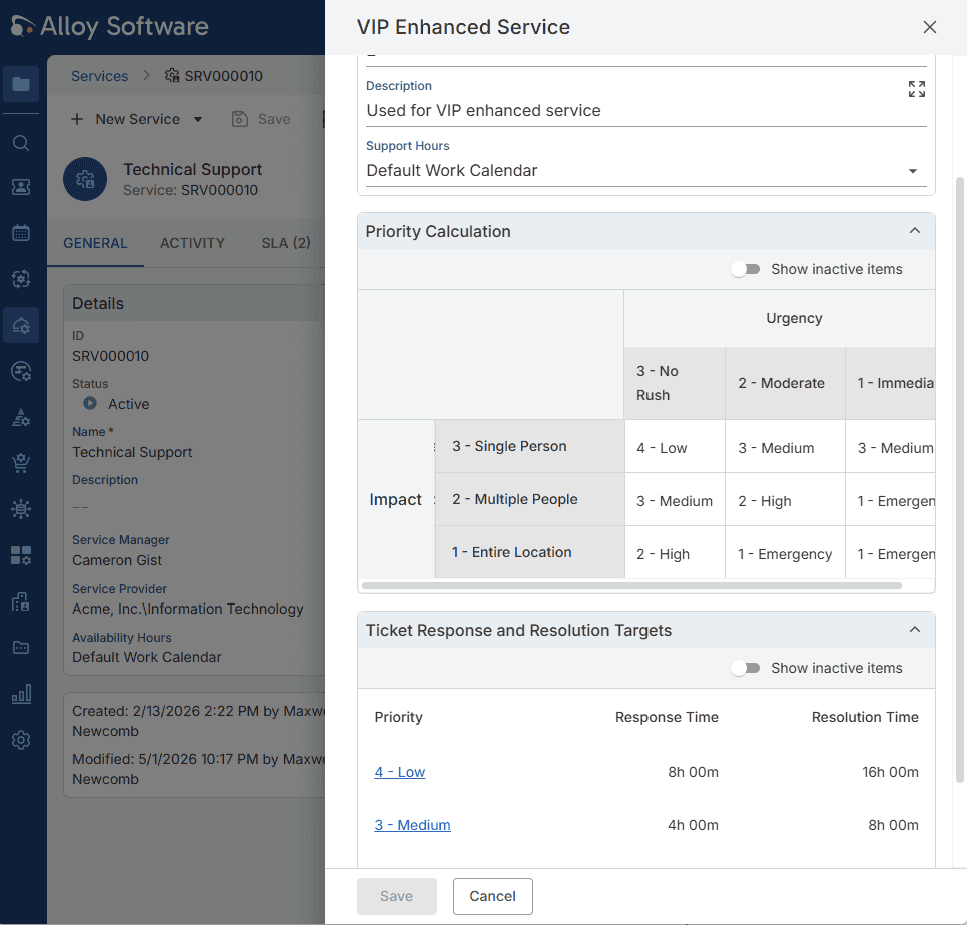
In Alloy Software’s ticket routing process, priority is calculated automatically from two independent inputs: impact (Single Person, Multiple People, or Entire Location) and urgency (No Rush, Moderate, Immediate). The system maps every combination to a priority level, from Low to Emergency, and applies the corresponding SLA targets without any agent involvement.
Most support environments use several routing models in combination. Here are the most common types, roughly in the order teams should implement them.
Department-based routing handles the obvious split—IT, HR, Facilities, Finance, Security—and eliminates the manual sorting that clogs every general inbox.
Alloy Navigator is primarily an IT service management platform, meaning its focus is on IT services. But thanks to the data segmentation capability, clients can create separate support environments for different departments. In this case, separate mailboxes and Self-Service Portals are used to deliver requests to IT, HR, or Finances. Moreover, support data from different departments stay separate, ensuring security and protection of personal data.
Not every ticket deserves the same queue. Priority-based routing ensures that high-impact issues—outages, executive requests, business-critical failures—reach the right people without waiting behind routine requests.
This model also protects SLA performance. Tickets that could breach should not compete with password resets for agent attention.
Skill-based routing sends work to the agent who can actually solve it, not just the next available person. Without it, tickets bounce between generalists and specialists, creating extra handoffs, longer resolution times, and unclear accountability.
This layer pays off most in environments with specialized systems, technical tiers, or domain-specific support teams. It also requires stable categories and clear ownership before it’s worth configuring.
Global support teams can’t afford tickets landing in the right department but the wrong region. Language and time-zone routing sends requests to the team best positioned to respond during working hours, in the requester’s language.
It improves both response speed and communication quality, and prevents the common failure of a perfectly classified ticket sitting unanswered overnight.
Workload-based routing distributes tickets across available agents to prevent any one queue or person from absorbing a disproportionate share of incoming volume. It reduces burnout, prevents backlogs, and keeps the whole team running at sustainable capacity.
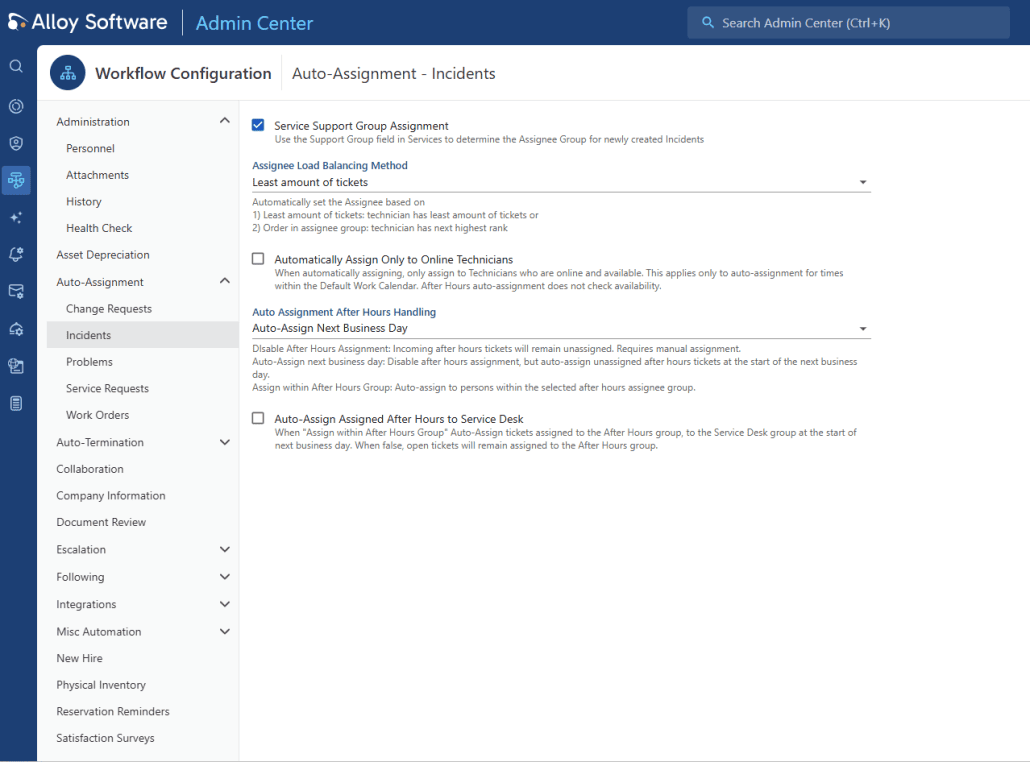
In Alloy Software, balancing is configured directly in the Workflow Configuration panel. The Assignee Load Balancing Method can be set to “Least amount of tickets”. The system assigns each incoming incident to the technician carrying the lightest load, or to whoever holds the next rank in the assignee group.
After-hours volume is covered by a dedicated Auto Assignment setting. When set to “Auto-Assign Next Business Day,” tickets submitted outside working hours are held and automatically assigned at the start of the next shift, with no overnight coverage or manual morning triage required.
High-value or sensitive accounts need dedicated handling—not just faster responses, but the right team, the right communication style, and often restricted visibility. VIP routing sends these tickets to a specific queue staffed by people trained for high-stakes cases.
In many organizations this pairs with role-based access controls: in HR, Finance, or executive workflows, assignment accuracy alone isn’t enough if the wrong agents can still see the ticket.
Standard priority-based routing uses the priority set at ticket creation. SLA-risk routing goes further: it monitors tickets in-flight and re-routes or escalates automatically when a ticket is approaching breach—regardless of its original priority.
This matters because not all high-risk tickets start life as high-priority. A routine request submitted on Friday afternoon can become a breach candidate by Monday morning. SLA-risk routing catches that. Static priority rules don’t.
What this looks like in practice:
None of these assignments require anyone to read the ticket. The routing logic handles it.
The operational gains from automated ticket routing are measurable and show up quickly.
Real-world results back this up. Salvage Direct reduced monthly support calls from nearly 2,000 to under 300 after centralizing intake and implementing systematic process improvements. The Juilliard School reported that automating assignments and escalations directly reduced how long users waited to receive service.
AI-powered routing has become a prominent feature in most modern service desk platforms, and for good reason. It handles the cases that rule-based logic can’t.
Intent detection: understands what a user actually needs, not just what words they used
AI routing delivers the most value in environments with high ticket volume, inconsistent language, or messy intake—where rule-based logic would require hundreds of manually maintained conditions. It’s also essential for multilingual support and for catching the intent behind ambiguously worded requests.
In Alloy Navigator, AI suggests the correct category at intake, catching misclassifications before they reach the routing layer.
When assigning a ticket, it factors in
This way a high-priority network issue reaches a senior technician who is actually free, while routine requests go to the general queue. For tickets already in the system, AI monitors SLA timers continuously and flags breach risk before it materializes.
At the self-service level, an AI Assistant resolves routine issues conversationally—meaning a share of tickets that would have needed routing never enter the queue at all. Read more about AI in Alloy Navigator →
AI is not a substitute for operational structure. If your categories are vague, ownership is unclear, or your historical data reflects years of inconsistent assignment, an AI model will learn those patterns and reproduce them.
The right framing would be to place AI as a layer on top of routing foundations, not a replacement for them. Use it to handle edge cases, improve classification accuracy, and scale the system after the underlying logic already works.
Routing failures are rarely caused by bad technology. They’re almost always caused by weak process design underneath.
Instead of repeatedly solving the same routing problems manually, you can learn to prevent them altogether with the right setup.
The right implementation sequence is always simple to complex. Teams that start with the most sophisticated rule tree possible almost always end up rebuilding it from scratch six months later.
Each step builds on the one before it. Push advanced automation onto a weak foundation and it will surface every flaw in your service design.
Routing is an operational mechanism, and it should be measured like one. The metrics that matter:
Tracking these metrics is the starting point, but numbers only tell you something useful if you’re measuring the right things for your service model. ITIL-aligned KPIs give routing metrics context: they connect assignment efficiency to broader service commitments, so you’re not just watching numbers move. We covered how to choose and apply them here: ITIL KPIs: What to Measure and Why→
Org structures change. Teams merge and split. New services get introduced. Ticket patterns evolve. And if you’re using AI-assisted routing, the model itself needs periodic retraining as classification patterns shift.
Build a regular review cadence: quarterly at minimum, monthly in high-volume environments. Look at exception queues, audit recent reassignments, and check whether current rules reflect how your support organization operates now, not when the rules were written.
Follow us on LinkedIn for the latest product insights, feature previews, and more exclusive updates.
Automated ticket routing is not just a speed improvement, but a consistency and ownership mechanism. It makes support operations scalable without growing a team of people whose only job is moving work around.
When routing strategy is efficient, tickets reach the right people faster, specialist skills get used appropriately, SLA commitments hold under volume, and internal service teams can run repeatable workflows without constant manual intervention.
AI can sharpen routing significantly—better classification, better handling of edge cases, better adaptation to changing patterns. But AI routing built on a weak foundation just fails in more sophisticated ways.
If your team is still manually routing tickets at scale, the cost is already real. The question is when you fix it—and whether you build it right from the start.