Reasons to Use Chromebooks in School in 2026
Explore the pros, cons, and classroom impact of Chromebooks in 2026, plus tips for choosing the right device for students.


Explore the pros, cons, and classroom impact of Chromebooks in 2026, plus tips for choosing the right device for students.
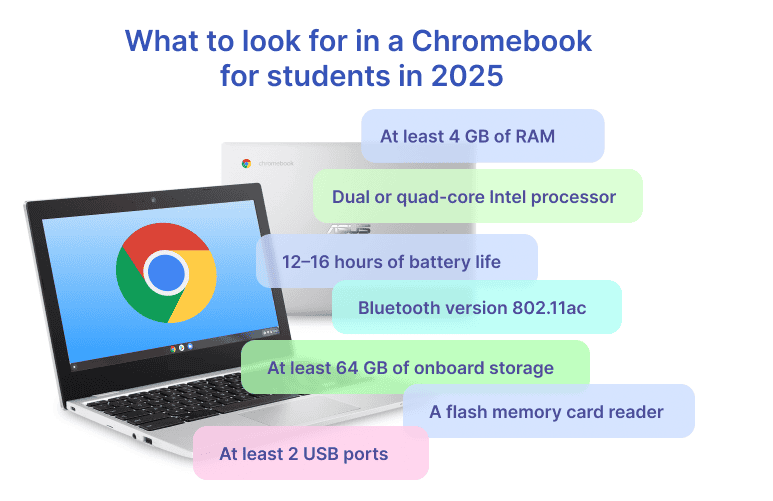
The digitalization of education in the U.S. is in full swing, with Chromebooks making a significant contribution. The surge in remote learning during the COVID-19 pandemic turned Chromebooks into the default classroom device, and the habit stuck. Worldwide K-12 mobile PC shipments, including notebooks, Chromebooks and tablets, grew 27% during 2025 to reach 43 million units, according to Futuresource Consulting’s Tracker, with refresh activity in the U.S. and Japan’s GIGA2 rollout named as the drivers. Chromebook’s affordability, simplicity, and seamless integration with online learning platforms have made Chromebooks the go-to choice for schools that want modern, tech-driven education.
While students are busy filming videos on how to break a Chromebook the fastest, let’s take a closer look at how these devices impact learning—and how students and teachers can use them to enhance the educational experience.
A Chromebook is a type of laptop designed primarily to be used while connected to the internet. The reason for the name is that all Chromebooks run on ChromeOS, a lightweight operating system developed by Google. Chromebooks are made by a variety of well-known tech companies, including Acer, HP, Lenovo, ASUS, Dell, and Samsung. While the design and build quality can vary across models, they all follow Google’s hardware and software standards for Chrome OS devices.
Upd: In May 2026, Google introduced a second, premium laptop line called the Googlebook, running a different operating system. It is not a Chromebook and it is not a school device. ChromeOS, the Chromebook name and the Google Admin console all continue in education – we cover it in detail further down.
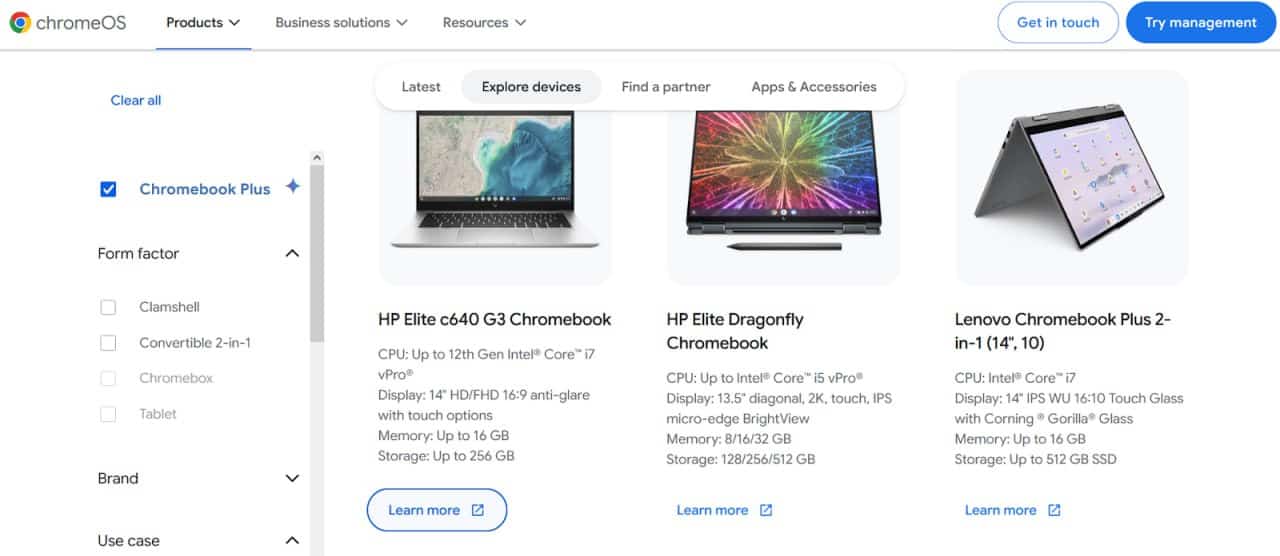
Chromebooks are generally much cheaper than traditional laptops, with most models priced between $200 and $400. This lower cost is a major advantage for schools, where devices are purchased in bulk. But how do Chromebooks offer a solid performance while keeping prices so low?
Most Chromebook models use Solid-State Drives (SSDs) instead of traditional Hard Disk Drives (HDDs), and this makes a big difference in their performance.
HDDs are mechanical drives that store data on spinning magnetic disks. While they can hold large amounts of data at a low cost, they’re slower, drain more battery, and are more vulnerable to damage from bumps and drops due to their moving parts.
SSDs, on the other hand, have no moving parts. They use flash memory to store data, which results in:
While SSDs are typically more expensive per gigabyte than HDDs—especially for large storage sizes—Chromebooks often deploy low-capacity SSDs (like 32GB or 64GB). This amount of built-in memory is enough for tasks in the classroom as Chromebooks rely heavily on cloud-based apps and storage.
In 2026, one caveat is worth your attention at the quote stage: with flash and DRAM prices up sharply, vendors are adjusting configurations as well as prices, so verify RAM and storage on the exact SKU rather than assuming the previous year’s spec carried over.
Chromebooks are focused on cloud services and designed to work seamlessly with Google Workspace for Education—a suite of cloud services that includes Gmail, Drive, Docs, Sheets, Slides, and Classroom. These services are fully integrated into the ChromeOS environment, and all data is stored and synced via Google Cloud, ensuring access from any device with an internet connection.
Read a related article: Google Classroom Alternatives ->
Using the Google Admin Console, school IT administrators can centrally manage all Chromebooks: push updates, configure settings, install or block apps, lock lost or stolen devices, and enforce security policies. Each student logs into a school-managed Google account, which keeps their settings, apps, and files consistent across any Chromebook.
Google added two rounds of classroom controls during 2026. At BETT in January it shipped a Class tools display app, teacher-led screen sharing and on-screen annotations. April Zhou, Software Engineer for ChromeOS Education, described the display app as a tool letting teachers “mirror their own or a student’s screen to the classroom display.” At ISTELive 26 in June, Google added a Guided Learning lock that pins a student’s screen to a single assigned task. Plus a change aimed squarely at district admins: enrollment limits per organizational unit, so one school cannot quietly consume the district’s ChromeOS license pool. Both arrived in July 2026. The Guided Learning lock requires Education Plus or the Teaching and Learning add-on, and only works when the teacher and every student in the room are on Chromebooks.
Chromebooks are built to be safe and stable. They come with built-in virus protection, so schools don’t need to worry about installing extra security features. Automatic updates keep every device up to date with the latest features and security patches.
Administrators can set strict access controls, making sure students only visit approved websites and use trusted apps. On top of that, Chromebooks rely on cloud-based storage, which means student work is automatically backed up online. Even if a device is lost or damaged, nothing is lost—just log into your Google account on another Chromebook and pick up right where you left off.
Device-level hardening is real, but it does not solve the problem entirely, and 2026 data makes the distinction concrete. Comparitech logged 104 ransomware attacks on education worldwide in the first half of 2026, 36 of them confirmed by the victims. 34 hit U.S. institutions, a 44% drop from the 61 attacks recorded in the second half of 2025. The K-12 examples are specific – Delano Public Schools cancelled classes for a day in May 2026 after an attack later claimed by LockBit. The district did not pay the $1.2 million demand, saying the attackers were locked out early. The largest recent breach, though, never touched an endpoint: the PowerSchool compromise exposed data on more than 60 million students and 10 million teachers through a student information system, and more than 100 school systems sued over it. A hardened Chromebook reduces endpoint risk. It does nothing about vendor and credential risk, which is where the damage is now concentrated.
Because Chromebooks are built around the Chrome browser and cloud-based services, they don’t support traditional desktop programs like Adobe Photoshop or the full version of Microsoft Office. Instead, users must rely on web-based alternatives or simplified mobile apps.
The gap moved in both directions during 2026. Gemini in Chrome and NotebookLM now run natively on Chromebook Plus devices, so a class of AI tooling arrived without any local install. In the other direction, Google shut down the Steam for Chromebooks beta on January 1, 2026, closing the local Linux-container route that a handful of CTE, game design and engineering programmes had been using for desktop-class software.
Since most Chromebook apps run in the cloud, a stable internet connection is essential for full functionality. Without access to Wi-Fi, K-12 students may find themselves unable to open documents, access assignments, or use key tools. Some apps like Google Docs offer limited offline modes, but they still don’t match the flexibility of fully installed software on regular laptops.
Lightweight, budget-grade hardware is what keeps Chromebooks cheap. For years, this affordability came with a hidden cost: short device lifespans. A 2023 investigation by the U.S. PIRG Education Fund, “Chromebook Churn”, found that school IT staff were replacing Chromebooks after roughly four years on average, while the hardware was often still working fine.
The real cause was Google’s Automatic Update Expiration (AUE) policy: it cut off security updates on a fixed schedule tied to the device’s release platform, not the school’s purchase date. The report also flagged a repair problem—spare parts were scarce and overpriced (some replacement keyboards cost nearly half the price of a new device), and manufacturers made small, non-functional redesigns between model revisions that made parts incompatible across generations. Schools ended up scrapping working laptops faster than the hardware itself justified.
The report landed with real weight: a 10,000-signature petition from parents, teachers, and school IT staff, plus shareholder pressure on Alphabet from Green Century Capital Management, pushed Google to respond. In September 2023, Google announced it would extend its Auto Update Policy to 10 years for all Chromebook platforms released from 2021 onward—more than doubling the previous 8-year window.
That policy is now fully in effect. Chromebooks on platforms after 2021 automatically get 10 years of automatic updates; older devices can opt into an extension. Google has also sped up repair workflows for schools and pushed manufacturers toward more durable, easier-to-repair builds.
That said, the policy change fixes the software side of the equation. The hardware side has finally started to move, though slowly. At FETC 2026 in January, Lenovo announced the Chromebook 100e Gen 5 and 500e 2-in-1 Gen 5 built around “Customer Replaceable Unit” components that school IT staff can swap on site without voiding the warranty – aimed at the USB-C charging port, the most common failure point on the previous generation. “The workforce of the future requires smarter technology today,” said Chris Babson, General Manager of Lenovo’s Commercial Education Portfolio. Sensible caution applies: these devices ship across the first half of 2026, so the durability claims are still vendor claims, and replacement-part pricing and lead times are unknown. Lower processing power remains a real constraint–and combined with physical wear and the vandalism covered below, it still pushes replacement well ahead of that 10-year software ceiling.
There is also a timing problem sitting underneath all of this. The Chromebooks bought during the 2020-2021 rush are reaching their AUE dates through the summer of 2026, and the federal money that funded them is gone – the final ESSER round expired on September 30, 2024. Because AUE is tied to the platform release year rather than the purchase date, two devices bought on the same purchase order can expire in different years. Refresh planning has to run off actual AUE data, not invoice dates, or a district will discover its cliff in August rather than in the budget cycle.
The Google Admin console helps schools manage their Chromebooks. Alloy Software helps them manage everything around those devices.
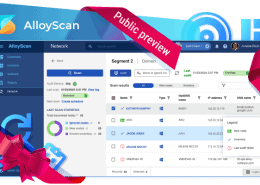
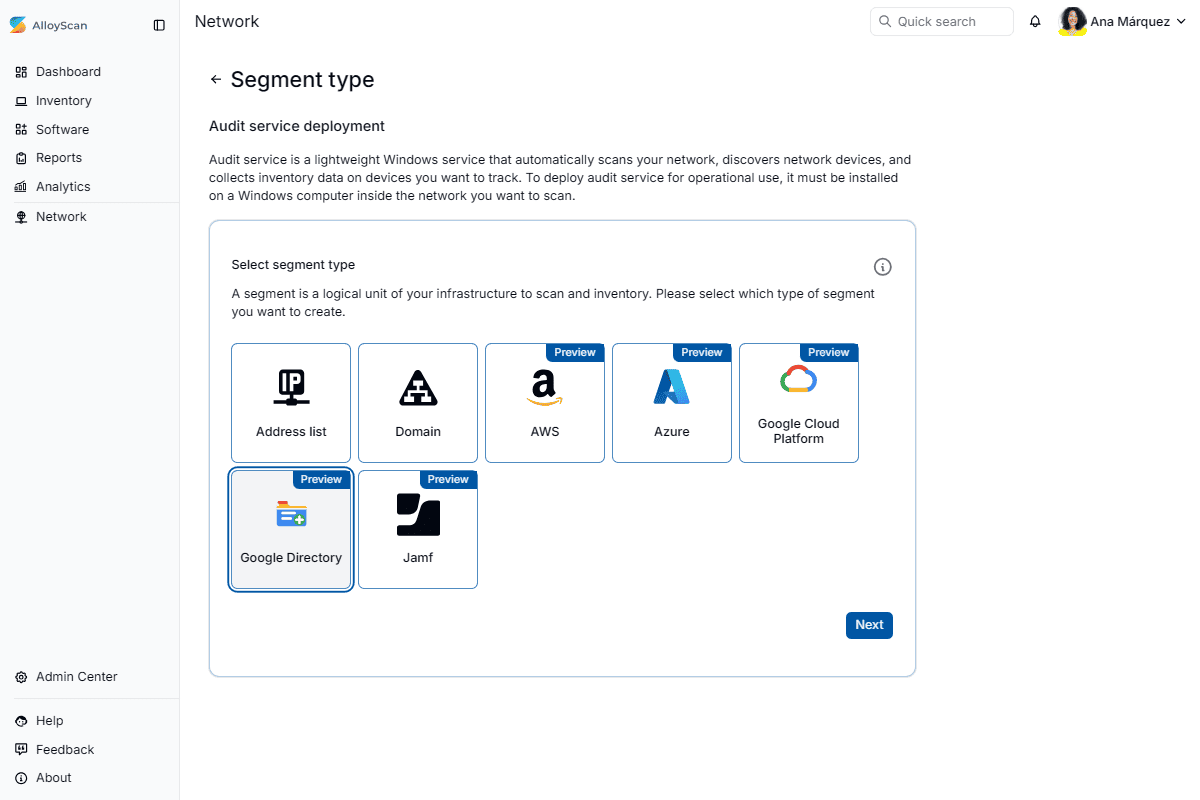
Our network inventory solutions automatically collect Chromebook data from the Google Admin console and bring it into the same IT asset management workflow as the district’s laptops, desktops, servers, printers, network equipment, and classroom technology. IT teams get one reliable view of devices across schools without maintaining separate records or repeatedly entering the same information.
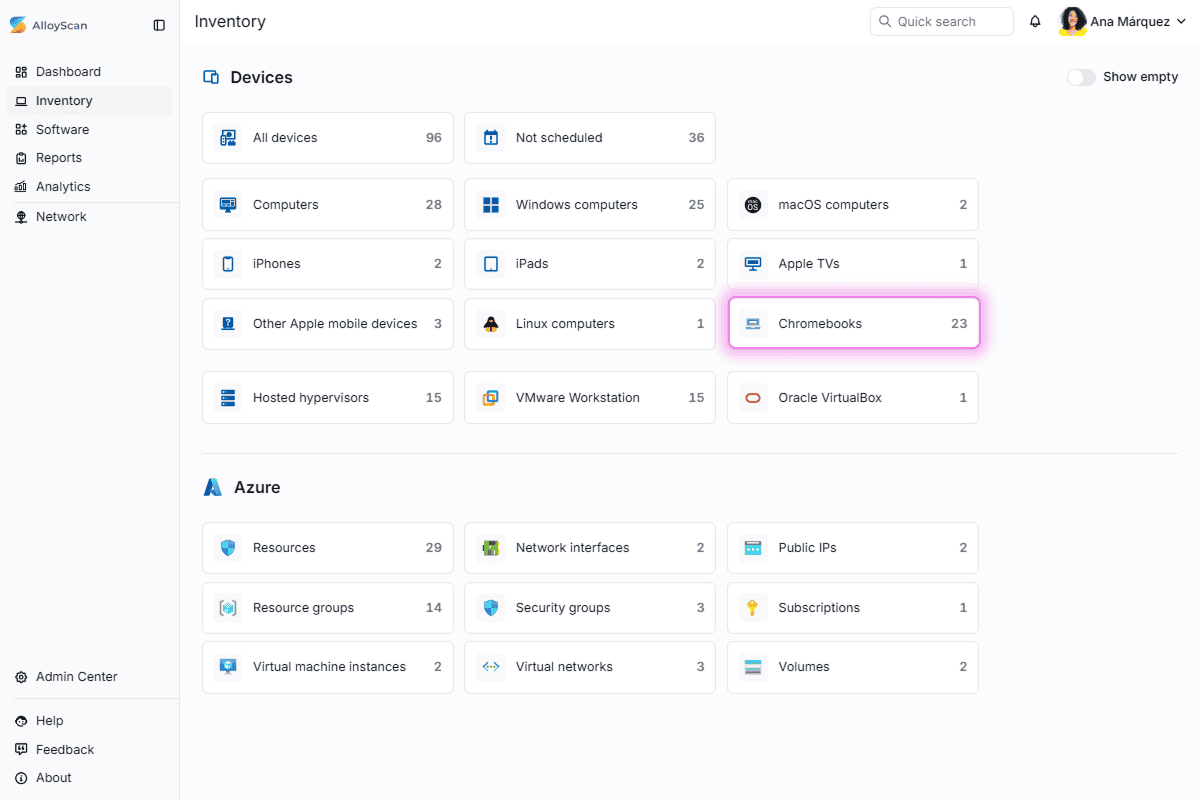
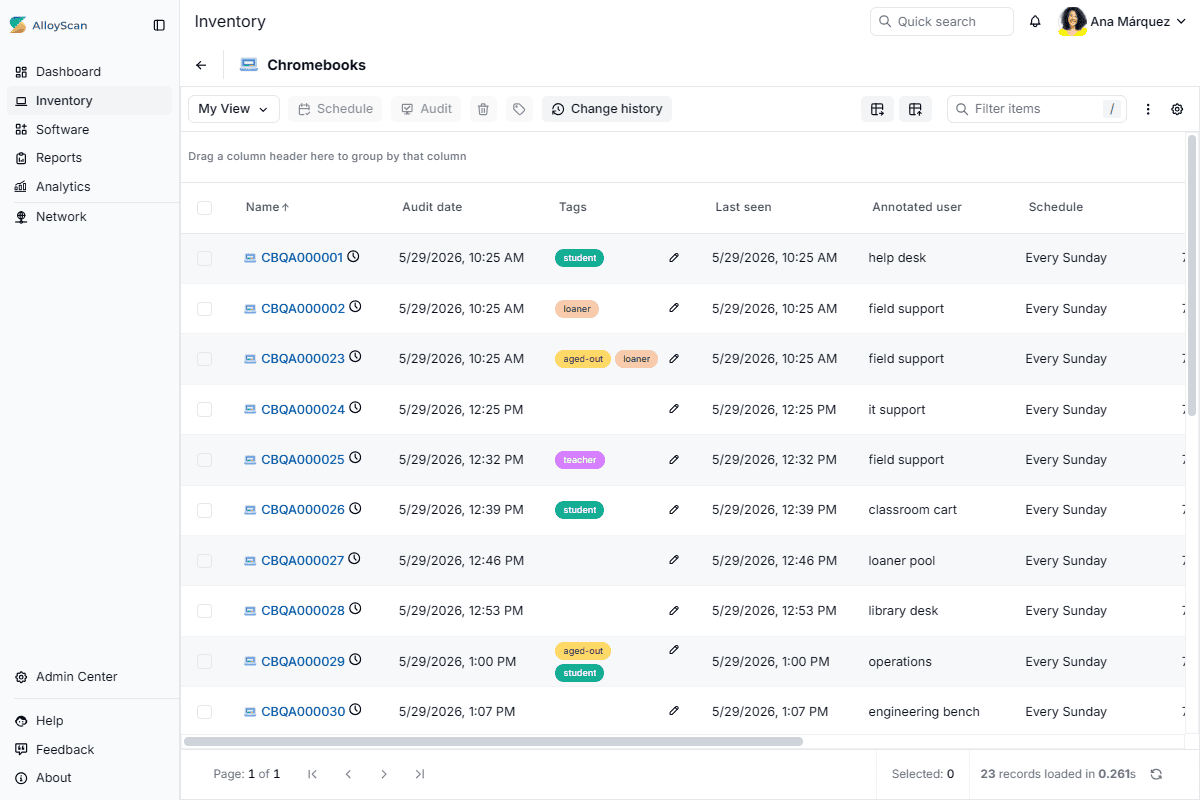
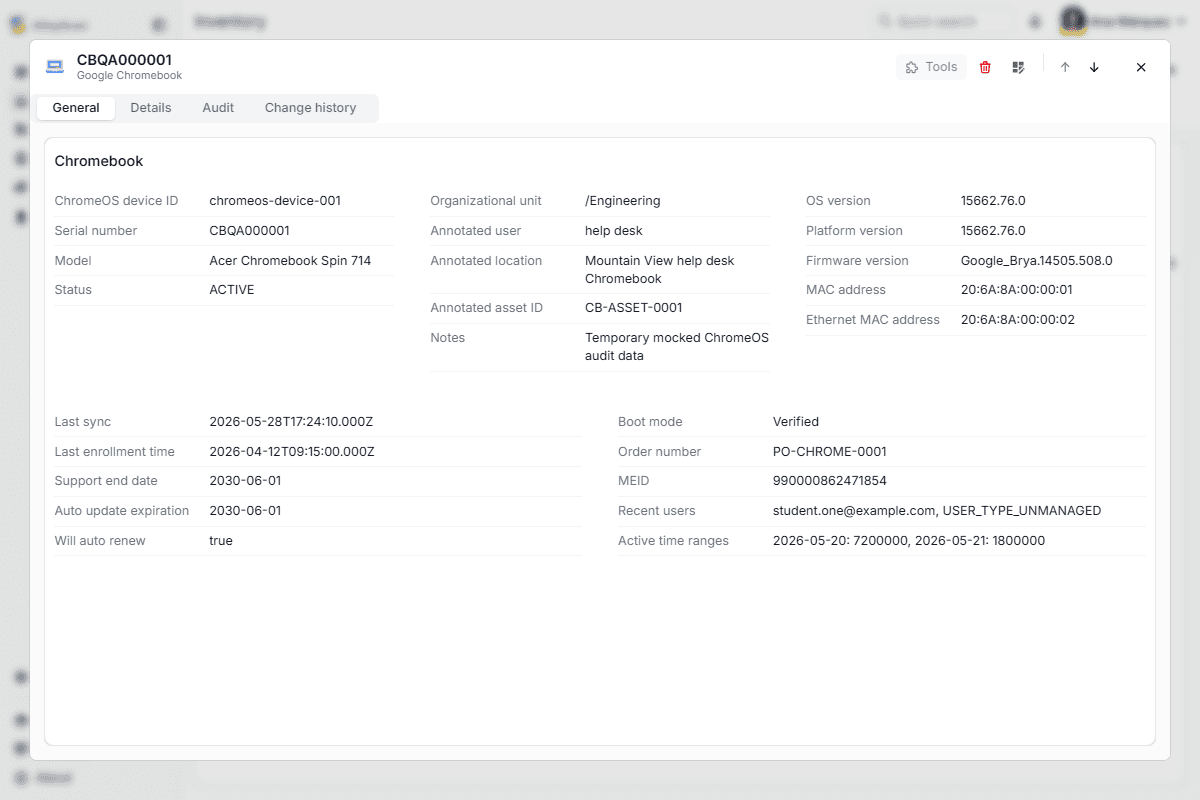
From procurement and deployment to support, reassignment, refresh planning, and retirement, every Chromebook remains connected to the people, locations, purchase records, and service history that matter. That means faster answers when a device is lost or needs repair, better visibility for budgeting and refresh cycles, and less administrative work for already stretched K-12 IT teams.
Two shifts this year make that visibility worth more than it was twelve months ago. Districts facing a summer AUE cliff need to segment a fleet by platform expiry rather than purchase date, so replacements can be staggered across budget years instead of landing in one. And districts moving from 1:1 back to shared classroom carts – a trend covered later in this article – are changing the unit of accountability mid-year, from a named student to a room and a check-out record. An inventory built around one model does not automatically handle the other.
Alloy Software has supported Chromebook discovery through our on-premises network inventory solution for years. In 2026, we extended that capability to our cloud-based solution, giving districts the flexibility to collect Chromebook data from the Google Admin console using the deployment model that works best for them. Whether they choose on-premises or cloud, Chromebook data feeds into the same complete ITAM workflow for lifecycle visibility and control.
Connect with our sales team to learn more!
For most of the last decade, Chromebook’s competition in schools was simple: full-price Windows laptops and iPads. In 2026, that got more complicated—though only one new contender is actually shipping, and it’s not the one making headlines.
On May 12, 2026, Google announced Googlebook, a new line of premium laptops running on Aluminium OS—an Android-and-ChromeOS hybrid built with Google’s Gemini AI wired into the operating system itself, not bolted on as an app. The five hardware partners are the same companies that build most Chromebooks today: Acer, ASUS, Dell, HP, and Lenovo. First devices ship in fall 2026.
Despite the shared Google branding, this isn’t a Chromebook replacement, and Google put that in writing the day after the announcement. “Chromebooks remain a reliable, long-term investment,” wrote Naveen Viswanatha, Director of Product Management for ChromeOS, in a post addressed to school and business buyers. The commitments are specific: ChromeOS keeps receiving 10 years of automatic updates, existing fleets stay manageable through the Google Admin console without buying new licences, and Google will provide multiple transition paths when one is needed. The company describes the change for enterprises and educational institutions as phased over the next couple of years, and points districts with ageing PCs toward ChromeOS Flex, which is free.
The thing worth watching, longer-term, is platform openness. ChromeOS won the classroom partly because Google locked it down tightly, making it hard for a student to install anything an IT admin hasn’t approved. Android, which Aluminium OS is built on, is a more open platform by design. Whether Google can recreate ChromeOS’s management simplicity on an Android base—without reopening the side-loading and app-sprawl problems schools have spent a decade avoiding—is still an open question, and one Google hasn’t had to answer yet.
Apple released the MacBook Neo on March 11, 2026—the least expensive Mac the company has ever sold, starting at $599 ($499 with education pricing). It runs full macOS Tahoe with Apple Intelligence on an A18 Pro chip, the same chip family that powers the iPhone: a real Mac at iPhone pricing, rather than a stripped-down “budget edition” of the usual Mac experience.
For schools, however, bringing in MacBook Neo means running two management systems side by side. Most K-12 IT departments run their fleet through Google Workspace and the Google Admin Console. Apple’s device-management stack (Apple School Manager, MDM via Jamf or similar) is a separate ecosystem, with its own provisioning and no native overlap with Google Classroom workflows.
The 2026 component squeeze also lands unevenly across the two. Omdia expects Mac shipments to decline roughly 5% this year against 28% for Chrome devices, crediting Apple’s vertically integrated supply chain and premium positioning. A budget platform simply has less margin in which to absorb a memory price shock – which narrows the price gap between the two categories from the direction schools would least like.
It is worth a mention for context, since it’s the most direct precedent for either of the above: Microsoft already tried to out-compete Chromebook in K-8 classrooms, and the attempt is now ending. Windows 11 SE launched in November 2021 alongside Microsoft’s own $249 Surface Laptop SE, plus OEM devices from Acer, Asus, Dell, HP, Lenovo, and others. In August 2025, Microsoft quietly updated a support FAQ page to confirm the OS would stop receiving feature updates and lose all support by October 2026—no press release, no announcement, just an edited webpage.
The reasons it failed make a useful checklist for evaluating any new entrant. It arrived years after Chromebook and Google Classroom were already the default in U.S. classrooms. Underneath the restrictions, it was still full Windows 11, which meant it inherited Windows’ resource demands on hardware priced and built to avoid exactly that. And its device management, run through Microsoft Intune, never matched the simplicity IT admins already had with Google’s Admin Console. None of Windows 11 SE’s trade-offs added up to a meaningfully better deal than just buying a Chromebook, and schools noticed that early.
| Device | Status in 2026 | Platform | Starting price | Built for K-12? |
|---|---|---|---|---|
| Chromebook | Still the default K-12 device – but ChromeOS shipments are forecast to fall about 28% in 2026 on component costs (Omdia) | ChromeOS | $200-$699 (Plus tier with Gemini AI); rising – memory and storage add $90-$165 per device since early 2025 | Yes, purpose-built |
| Googlebook | Announced May 12, 2026; shipping fall 2026 (premium tier only) | Aluminium OS (Android + ChromeOS hybrid) | $999+ at launch; education “AL Entry” tier planned, no date set | Not yet – Google commits to continued ChromeOS support for schools and describes the shift as phased over the next couple of years |
| MacBook Neo | Shipping since March 2026; Omdia expects Mac shipments to fall only ~5% in 2026 vs ~28% for Chrome devices | macOS Tahoe | $599 ($499 for education) | No – general-purpose Mac, separate management ecosystem |
| Windows 11 SE / Surface Laptop SE | Discontinued – support ends October 2026 | Windows 11 (restricted) | $249 (Surface Laptop SE) | Was intended to be – failed to gain traction |
Follow us on LinkedIn for the latest product insights, feature previews, and more exclusive updates.
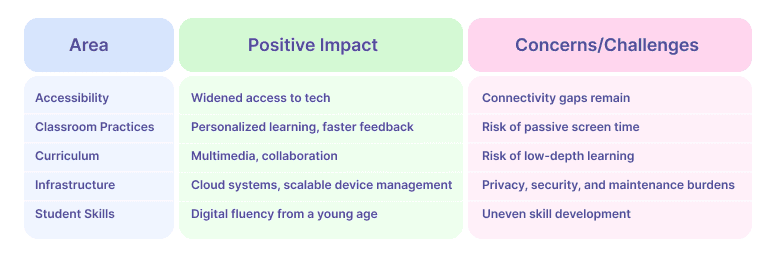
Chromebooks have played a major role in expanding access to digital learning, especially in underfunded school districts. Their affordability helped implement the 1:1 device programs in K-12, ensuring that every student had access to a personal learning device. During the COVID-19 pandemic, millions of Chromebooks were distributed nationwide to support remote learning, bringing digital equity to students across the United States.
However, owning a device is only part of the equation. While many students received Chromebooks, some lacked steady access to the internet, especially those living in low-income households with no wi-fi connection or in rural areas. This shows that achieving technological equity requires efforts not only to provide access to devices, but also to ensure widespread and stable internet connectivity to the students who need it.As of February 2026 that second half got harder: E-Rate can no longer be used to fund the take-home hotspots many districts relied on to close the gap.
There is a second sense of “accessibility” where Chromebooks have quietly become stronger, and it now carries procurement weight. Face control, built into every Chromebook, lets a student move the cursor with head movement and facial gestures; the machine-learning models download once and then run offline, and Google states no personal data is collected. Black Gold School Division in Alberta, Canada – 32 schools, 14,000 students – adopted it for a seventh grader named Liam, who had previously needed to disconnect physical switches from his wheelchair in order to use a computer. The division’s own write-up calls the feature “a key to freedom.” It matters at exam time too: College Board’s Bluebook app, used for the SAT Suite and most AP exams, exposes Google’s built-in ChromeVox screen reader and Dictation to Chromebook test takers.
Chromebooks have shifted many classrooms from traditional models toward more adaptive, student-centered education. Providing each student with a personal device and implementing centralized systems for assignment submission and grading, along with the ability to distribute digital learning materials, have contributed to the widespread adoption of blended learning models in schools. Blended learning is an educational approach that combines traditional face-to-face instruction with online learning components. This allows students to have some control over the time, place, pace, or path of their personal learning experience.
This shift has also transformed classroom management: teachers can now monitor student progress in real time, assign and collect work digitally, and offer instant feedback. However, this requires continuous professional development and thoughtful pedagogical integration. Without careful planning, there’s a risk of overreliance on screen time and digital checkboxes at the expense of meaningful, reflective learning. Vendors now concede that training, not tooling, is the binding constraint: at ISTELive 26 in June 2026 Google announced the Google AI Educator Series with ISTE+ASCD, with the stated ambition of making AI training available to all 6 million U.S. educators.
Multiple schools in the US have reported that students’ grades in various subjects had improved after Chromebooks’ implementation. Easy access to multimedia and educational apps has broadened the learning process beyond just reading the textbook. With opportunities for independent research, project-based learning, and creative digital output, students are now encouraged to think and analyze, developing their research literacy and critical thinking skills.
The independent evidence is less flattering than the vendor case studies, and it is worth saying so plainly. A long-run evaluation of the One Laptop per Child programme in rural Peru, summarised by the Cato Institute in May 2026, followed students from 2007 to 2019 and found no effect on exam or test scores, and none on the likelihood of completing primary or secondary school or enrolling in a university. Devices change what a classroom can do. On their own, they do not change what students learn.
The widespread adoption of Chromebooks has catalyzed a major shift toward cloud-based infrastructure in schools. Districts began investing more in IT support, cybersecurity measures, and student data privacy policies, thus helping build a whole ecosystem of edtech tools.
However, challenges remain. According to Cybersecurity Dive, only one-third of school districts have a full-time employee dedicated to cybersecurity, and 12% of districts do not allocate any funds for cyber defense. Furthermore, two-thirds of ed tech leaders believe their districts lack sufficient resources to handle cybersecurity issues. This goes to show that technology decisions are made based on budget constraints rather than educational needs and safety.
Although Gen Z and Gen Alpha grew up with smartphones and tablets, using gadgets for entertainment doesn’t necessarily translate into digital fluency. Chromebooks help students build a broader set of essential digital skills. They learn how to manage files and store data in the cloud, write and reply to emails with proper etiquette, and communicate effectively on online platforms. Regular work in shared documents enhances their typing speed and familiarizes them with formatting tools. Chromebooks also support research literacy and digital safety, encouraging students to evaluate sources critically and navigate the internet responsibly. Over time, learners become more independent in adjusting settings, managing updates, and troubleshooting minor tech issues—boosting both their confidence and digital self-reliance.
Providing every student with an affordable, fast, and easy-to-manage digital device—fully integrated into the school network and backed by centralized IT support—sounds like a dream come true, doesn’t it? But as they say, the road to hell is paved with good intentions. Right now, a troubling trend called the “Chromebook Challenge” is gaining traction on social media, especially TikTok. In this trend, students intentionally damage school-issued Chromebooks—most often by inserting metal objects into USB ports or jamming pencil tips into charging slots, causing short circuits and, in many cases, smoke and internal damage.
The old rule of thumb – a three-year working life – dates from the pre-2024 policy era and no longer describes the software ceiling, which is now ten years from platform release. What it still describes is physical reality. A school Chromebook gets replaced early not only because of technical imperfections and cost savings, but also because of the way students treat the devices. In K-12 schools Chromebooks are given out to students for free, with parents only needing to pay for the replacement of the device. Which leads to K-12 students feeling less responsibility to keep their Chromebooks in a good state.
💡 Possible solution. Simply purchasing Chromebooks for students may not be enough. It is important to provide guidance on the safe and responsible use of these devices, as well as how to take care of them physically. This can help maximize Chromebooks’ performance, extend their lifespan, and teach students essential technical safety and device-handling skills.
If the curriculum allows, implementing a reward system—such as giving points for responsible and careful use of electronic devices—can be a great idea. While it might seem like a small detail, such incentives can be motivating for students in the long run.
In cases of consistent misuse or careless behavior, the school’s IT administration should consider revising its policies regarding parental compensation for damaged equipment.
Another growing concern — both for student safety and device turnover — is the challenge of tracking school-issued Chromebooks. Thomas P. DiNapoli, the New York State Comptroller reports up to 51% of school IT assets are unaccounted for in some districts. The audit also revealed that eight districts across the United States lacked proper safeguards to prevent the loss or damage of these devices.
The accounting problem sharpens as the funding cushion disappears. With ESSER and the Emergency Connectivity Fund both exhausted, a device that goes missing now comes straight out of the general fund rather than out of federal relief money. And the districts pulling devices out of backpacks and into classroom carts are changing the unit of accountability mid-year – from a named student to a room, a cart and a check-out log. Those are different records with different owners, and an inventory built around one does not automatically handle the other.
OK, but even though schools face some difficulties with replacement cycles and school IT burden, this is the price for better education and wider knowledge for students, right? Actually, the reality is a bit more complex.
A meta-analysis has shown that in primary and middle school, leisure digital reading tends to correlate negatively with text comprehension, but this relationship becomes positive in high school and university. This suggests that for younger students, reading on paper still plays an important role in developing core text comprehension skills. Relying too heavily on digital devices in early and middle school education might therefore be a problematic approach. Digital-based work is better left for older students.
However, the common problem of modern children is that they already have iPad addiction from a very young age. With digital devices being heavily integrated into the learning process since primary school, the situation may worsen. Constant and often unregulated use of technology can have detrimental effects on young children’s cognitive and social development.
Many teachers observe that children are increasingly inclined to look up answers online immediately, rather than attempting to analyze problems or develop solutions on their own. Having a Google-based device within arm’s reach only reinforces the pattern. It promotes cognitive laziness, where children expect quick answers without putting in the mental effort needed to understand or explore concepts deeply. If this problem stays untackled, instead of critical thinking and research literacy children will lose the memorizing skill and intellectual curiosity.
💡 Possible solution. To address the issue of cognitive laziness and the resulting decline in critical thinking skills, it is essential to strike a balance between the use of technology and traditional learning methods.
Educators and parents can encourage younger children to engage in real-life activities that foster real-world skills like motor coordination, interpersonal communication, problem solving and developing imagination. At this stage, hands-on learning and face-to-face interaction should be a priority.
More advanced digital work, such as large-scale online projects and regular use of digital platforms, can be introduced gradually in high school, when students are more cognitively mature and better equipped to use technology responsibly and productively. Teaching the use of Chromebooks as a tool for research—rather than providing students with a shortcut for answers—will also give educational benefits at this stage.
Setting clear boundaries for screen time and promoting “tech-free” periods throughout the school day can help students to learn digital hygiene and reduce dependency on digital devices. In Iowa, Utah and Tennessee, that is no longer a recommendation – it is the law from July 2026.
Chromebooks have revolutionized access to education by providing affordable, scalable, and user-friendly digital tools for students and educators alike. They’re cheaper, faster, safer, more durable, and enabled schools to bridge the digital divide—at least in part. However, the whole picture isn’t entirely rosy. Limited software compatibility and hardware fragility lead to excessively fast device turnover.
Chromebooks have sparked debate among educators: gadget addiction,overdependence on internet access, and growing concerns about passive learning habits and digital overexposure—especially in younger students. It is widely acknowledged that technical gains should not be achieved at the cost of educational depth or cognitive development.
To truly enhance the learning process, Chromebooks require thoughtful integration into broader educational strategies. This means combining digital innovation with hands-on, reflective learning, teaching students responsibility in both device care and online behavior, and investing in robust infrastructure—including cybersecurity and asset management systems.
Ultimately, technology should serve as a tool to empower—not replace—deep thinking, creativity, and curiosity. When used intentionally and supplemented by strong teaching practices and digital literacy education, Chromebooks can indeed be a valuable ally in modern learning.
This article was refreshed in August 2026 with Omdia’s shipment and component-cost forecasts, Google’s BETT and ISTELive 26 releases, its written commitment to ChromeOS in schools after the Googlebook announcement, the FCC’s rescission of E-Rate hotspot funding, six states’ new screen-time laws, and first-half 2026 education ransomware data.