AI Ticketing for IT Teams: How It Works, Benefits, and How to Get Started
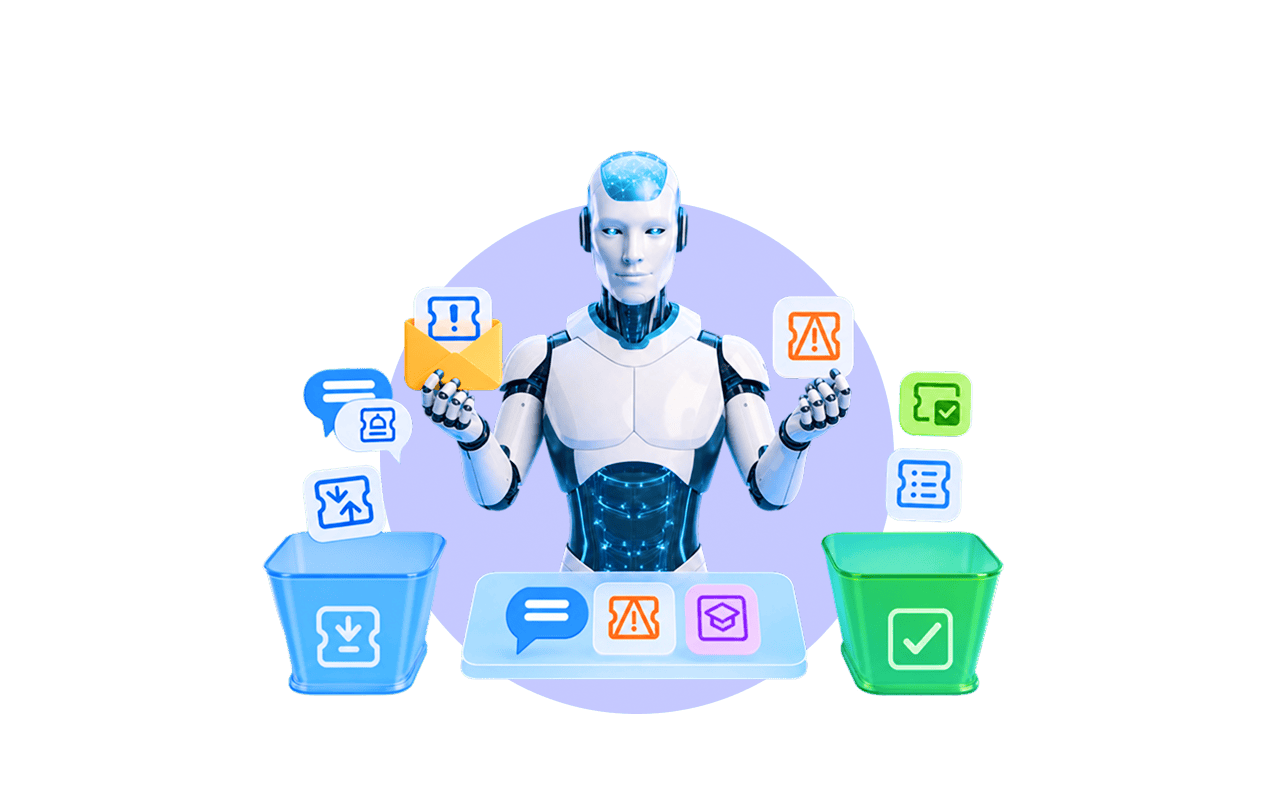


AI ticketing puts machine learning and language models to work on the IT help desk. An AI ticketing system reads tickets, sorts them, routes them, drafts replies, and resolves routine requests without a technician.
AI ticketing is an IT support workflow where an AI ticketing system reads, categorizes, routes, and drafts responses to support tickets using NLP and machine learning. In traditional systems that first pass is human, so throughput scales with headcount. Modern AI ticketing moves manual ticket handling to the exceptions.
Vendors label this differently: AI-based ticketing, AI-driven ticketing, AI-powered ticketing systems. The mechanism is the same, a model proposes and a human disposes. Most AI ticketing solutions sit on top of existing ticketing tools rather than replacing the ticketing process.
| Aspect | Manual ticketing | AI ticketing system |
|---|---|---|
| Categorization | Agent picks from a dropdown | Model suggests the category from ticket text |
| Routing | Static rules or manual assignment | Ticket is routed to the predicted best group |
| Prioritization | Fixed priority rules | Context-aware, based on impact and history |
| First reply | Agent writes every response | AI drafts a reply; the agent approves it |
| Volume handling | Grows with headcount | Routine requests are deflected before they become tickets |
| Reporting | Only as good as manual data entry | AI analytics, but still needs consistent categories |
Table 1. Traditional ticketing systems vs an AI ticketing system across everyday help desk tasks.
AI ticketing systems work in four layers: NLP reads the ticket, machine learning classifies it, generative models draft text, and agentic systems take multi-step actions. These systems use NLP to extract intent, urgency, and entities, so “my laptop won’t connect to VPN” becomes a categorized, routable request.
Machine learning learns your categorization and routing from past tickets, so these AI systems rely on volume: a clean archive matters more than a clever model or newer AI technology. Generative AI drafts replies through hosted LLMs like OpenAI or Azure OpenAI via an integration, metered per token.
Agentic AI plans and executes a sequence of steps with limited human intervention: diagnose, check inventory, order a replacement, update the ticket. Gartner recognized AI applications in ITSM as a distinct market in 2024, naming AI capabilities such as intelligent ticket triage and escalation.
“Agentic AI has emerged as a game-changer for customer service,” said Daniel O’Sullivan, Senior Director Analyst at Gartner (March 2025 press release).
Gartner projects that by 2029, agentic AI will autonomously resolve 80% of common customer service issues without human intervention, cutting operational costs by roughly 30%. That forecast covers customer service software broadly, not IT help desks, and most IT teams sit earlier on the curve.
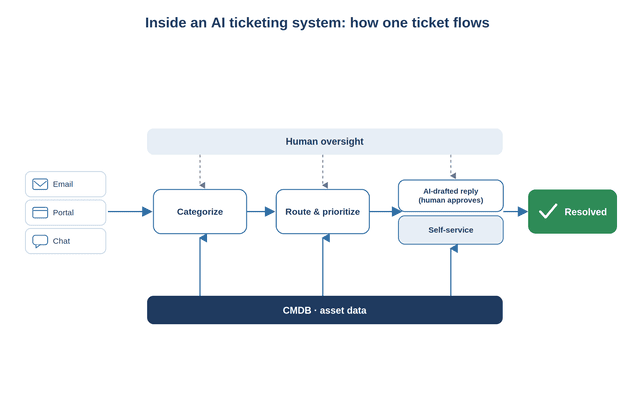
AI automates three concrete jobs inside a live ticketing system: it classifies tickets, routes them, and either drafts replies or deflects requests to self-service. Dashboards, SLA timers, and approvals stay standard ITSM machinery. Most teams use AI to automate those three and stop there.
Automatic classification means the AI reads a support ticket and assigns type, category, and priority from your existing classifiers, learned from ticket history. The catch is inherited: hundreds of near-duplicate categories created “to be organized” produce a model that reproduces the mess.
Prune before you automate, not after. Disable categories you no longer use, and both classification accuracy and reporting improve, because the same category tree feeds the model and the charts.
Smart routing sends the ticket to the group most likely to resolve it, using category and the relationships between services, assets, and teams. Escalation follows the same logic when the system detects SLA risk. The payoff is fewer reassignments: a ticket that bounced between three queues is routed once.
Routing quality degrades fast if team ownership is not modeled in the system. The AI only routes to groups it knows exist, so an unmapped team silently collects everything the model cannot place.
AI-drafted replies pull an answer from your knowledge base and write a response the agent reviews before sending. Self-service deflection is the larger lever: an AI-powered portal answers routine support requests like password resets, so they never become a manual ticket.
Draft quality tracks documentation quality. With three stale articles the AI writes confident nonsense, so publish your top ten repeat answers first and measure deflection per article, not in aggregate.
The benefits of AI ticketing systems come from mechanisms, not magic. AI ticketing systems automate support triage first, so people handle the rest, and each benefit below fails if its mechanism is missing.
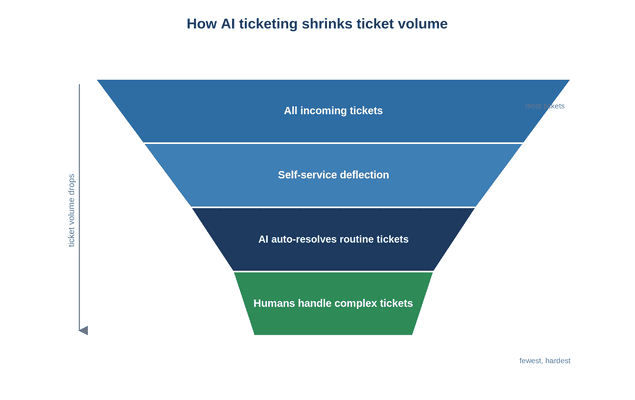
Resolution times drop because triage, routing, and drafting happen instantly, and technicians resolve issues sooner because each ticket arrives categorized and routed. Ticket volume drops because self-service deflection handles routine requests up front, which shortens response times for whatever is left.
Cost per ticket falls when the system handles repetitive, routine tasks and technicians focus on complex, high-value work. Ticketing automation pays for itself once deflection is real, not cosmetic, and the saving tracks your deflection rate, so treat Gartner’s 30% figure as a ceiling.
Better reporting comes from consistent categories feeding AI analytics, which gives a real-time picture of workload for leaders who must justify headcount. Service management has three parts: gather, manage, analyze. Analysis only works if categorization was correct at the gather stage.
Modern ticketing systems draw charts from bad categories without complaining, and nobody notices until the budget meeting. AI tools inherit that silence: the model reports a confident distribution across categories that never meant anything.
AI in ticketing fails in three predictable ways: bad data, weak data segmentation, and over-automation without oversight. Automated ticketing is not unattended ticketing. These are configuration and governance problems, and they surface after go-live.
Garbage in, garbage out is the core risk. If categories are inconsistent or the CMDB is stale, the AI mislabels, misroutes, and reports numbers no one can trust. Data hygiene, not model choice, decides whether it works.
Service management touches sensitive data: HR holds salaries and personal records, legal and finance hold confidential material. Data segmentation isolates one department’s data, so an AI agent, and even IT staff, see only authorized records. Facilities are the opposite and often prefer IT to see their tickets, which relate to asset management.
Buyers rarely ask for this by name. The request usually arrives as a use case: can we bring another team onto the same platform without IT seeing their data? That question, not the feature list, is what drives the automation boundary you end up configuring.
Integration effort is underestimated. Email, endpoint management, the CMDB: every integration takes configuration, not a single switch. Human oversight stays mandatory for change management, where an approval gate protects production. Platforms that fit ship strong defaults and still need setup.
An AI ticketing system depends on the CMDB, the relationships between tickets, assets, users, and locations. An AI agent that checks inventory and orders a replacement is only safe if the inventory is real; stale asset data turns automation into confident mistakes.
Asset management therefore comes before service management. Automated network inventory and discovery keep the underlying data live, so AI decisions rest on facts. That is the job of Alloy’s integrated network inventory and the cloud-based AlloyScan.
Regulated industries need on-premise deployment or a controlled cloud, plus clear rules for how AI handles data. Healthcare under HIPAA, public-sector security policies, and air-gapped aviation or energy networks rule out sending ticket text to a public-cloud LLM. AI-powered systems calling an external API need explicit sign-off.
The trade-off is control versus convenience. Some AI ticketing systems let you bring your own model and API key, cap AI automation, or disable AI entirely. Ask where prompts are logged and for how long. That answer, not the marketing page, decides approval.
| Deployment | Best fit | AI and compliance notes |
|---|---|---|
| On-premise | Healthcare, government, air-gapped networks | Full data control; AI via approved models and keys only |
| Cloud | Small teams avoiding infrastructure overhead | Faster setup; verify data handling and retention terms |
| Hybrid | Mixed compliance and scale needs | On-prem for sensitive data, cloud where policy allows |
AI ticketing pays off with real ticket caseload, consistent categories, and reasonably accurate asset data. Maturity is the gate: ITIL-style practices suit mid-market to enterprise teams, while an ad-hoc small shop should fix the basics first. Lighter help desk editions exist precisely for teams that run no formal ITIL practices.
No best AI ticket engine fixes bad ticket management data; the right AI ticketing system only amplifies what you already have. Rolling out new processes is a large effort, and the goal is effective services, not a better process diagram.
You are ready when:
Hold off when:
To roll out AI ticketing, clean your data first, automate one workflow with a human in the loop, measure, then expand. If three kinds of automation go live together, you cannot tell which one moved your numbers, or which one to roll back.
1. Prune categories and classifiers so the list is tight and meaningful.
2. Connect your knowledge base and CMDB, so AI answers and routing rest on real data.
3. Turn on AI-assisted classification to automate routing for one ticket type.
4. Add AI-drafted replies with mandatory human approval before sending.
5. Enable self-service deflection for your top routine requests.
6. Track response times, resolution times, and inbound volume against a baseline.
7. Add guardrails, data segmentation, and oversight to your AI workflows before letting autonomous AI agents act.
Record the baseline before step three, not after. One month of ticket counts, first-response and ticket resolution time gives you the only evidence that survives a budget review. AI eliminates the first-pass sort, not the need to prove it worked.
Alloy Navigator is an AI-powered ITSM platform with an assistive, configurable approach: AI helps draft and process ticket text, while classification, routing, and workflow stay under your control. The AI features cover everyday text work: summarize a long ticket, improve tone, translate, plus speech recognition.
It reaches OpenAI API and Azure OpenAI Service through an integration. You supply the API key, control AI automation and cost, and can disable AI entirely, which matters for regulated teams. Underneath, a configurable classification engine drives auto-routing, prioritization, and escalation.
Because Alloy Navigator integrates ITSM, IT asset management, network inventory, and a CMDB in one platform, tickets connect to the assets and people they concern, and ticket merging simplifies ticket handling across email, portal, and chat. It runs on-premise or in the cloud, with HIPAA and GDPR support.
The honest positioning: advanced AI ticketing is marketed as autonomous, while Alloy’s AI is assistive and controllable. For a regulated team that needs automation with data segmentation and human oversight, that boundary is the selection criterion, not a limitation.
No. AI ticketing automates repetitive triage, routing, and first-draft replies, which allows support teams to focus on complex problems, judgment calls, and change approvals. AI agents handle routine requests end to end, but human oversight stays essential for anything touching production. See our help desk software.
No. AI ticketing suits mid-market IT teams too, especially those drowning in repetitive tickets with a small staff. The requirement is not size but readiness: consistent categories, usable documentation, and accurate asset data. Very small teams with low volume see little return. Explore Alloy’s ITSM options.
It can be, with the right controls. Data segmentation keeps HR, legal, and finance records isolated, so an AI agent and IT staff see only authorized data. On-premise deployment, approved LLMs, your own API keys, and an off switch let compliance teams govern what leaves the network. Review HIPAA and GDPR posture.