IT Asset Visibility: What It Is, Why It Matters, and How to Achieve It
IT asset visibility explained: key concepts, common gaps, maturity levels, and a step-by-step framework for complex IT environments.


IT asset visibility explained: key concepts, common gaps, maturity levels, and a step-by-step framework for complex IT environments.
IT asset visibility means having a reliable view of the technology your organization depends on. It shows what assets exist, who uses them, where they are, and how they fit into everyday IT operations.
This visibility does not come from device inventories. It comes from connecting discovery data, asset records, lifecycle history, and service workflows in one place, so asset information supports real decisions instead of sitting in a static database.
This article explains how to achieve complete asset visibility: what it requires, where organizations usually lose control, and how to create a structured workflow without adding unnecessary work for your IT team.
IT asset management comes with a dense vocabulary where terms are often used interchangeably, even when they mean different things. Understanding the distinctions matters, both for evaluating tools and for having internal conversations about what your team needs.
| Term | What it means |
| Asset Discovery | The automated process of finding and identifying devices on your network—or beyond it, via agents. Discovery tells you what assets exist in an environment. It does not tell you who owns them, what they cost, or whether they are authorized. |
| Asset Inventory | A structured database of asset records. Discovery feeds the inventory, but the inventory also contains data that discovery cannot capture on its own: purchase history, cloud assets, assigned users, warranties, contracts. |
| Asset Tracking | The ongoing process of monitoring the asset landscape: ownership, location, state, and changes to each asset across its lifecycle. Tracking is what keeps an inventory current after initial discovery. |
| IT Asset Management (ITAM) | The full practice of managing IT assets from procurement through disposal—covering cost, lifecycle, compliance, licensing, and financial accountability. ITAM is an umbrella discipline; the other things we’ve mentioned are separate processes within ITAM. |
| Network Inventory | Automated collection of hardware and software data directly from devices on the network (and via agents for off-network endpoints). This is how an ITAM database gets enriched with real technical detail: RAM, BIOS version, installed software, patch level, and so on. |
| ITSM (IT Service Management) | A discipline that handles IT services and support: tickets, incidents, change requests, approvals, and workflows. When ITSM is connected to ITAM, service requests can reference live asset data—making support faster and more informed. |
| IT Asset Visibility | The result of all the above working together. When your team can answer questions about any asset—what it is, where it is, who uses it, what state it is in, and what is happening with it right now—you have asset visibility. It is not a process; it is an outcome. |

The environments IT teams manage now look nothing like they did a decade ago. Devices are remote. Networks are hybrid. SaaS tools multiply without central procurement. Contractors use personal devices. Cloud resources spin up and down on demand. As a result, many organizations are losing a bird’s eye view of their technology stack. Flexera 2025 State of ITAM Report shows that full visibility has declined from 47% to 43% year over year.
At the same time, IT spending continues to grow. Gartner’s 2026 forecast projects worldwide IT spending to keep accelerating, with enterprise software investments expected to exceed $1.4 trillion. Much of this capital is being funneled into digital resilience to meet stringent frameworks like the EU’s Digital Operational Resilience Act (DORA). Under DORA’s third-party risk management pillar, organizations are legally mandated to maintain an exhaustive, real-time registry of all ICT assets and external dependencies. So, IT asset visibility becomes a regulatory requirement rather than a purely technical or business concern.
Organizations need asset data that is accurate, connected, and available on demand, especially for software audits, where missing installation records, unclear license ownership, or outdated usage data can quickly turn into financial and compliance risk.
For a closer look at how to prepare for a software audit, read our guide to software audits.
Good visibility covers more than a list of laptops. Organizations typically need clear information across several categories:
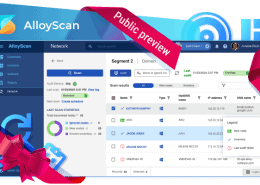
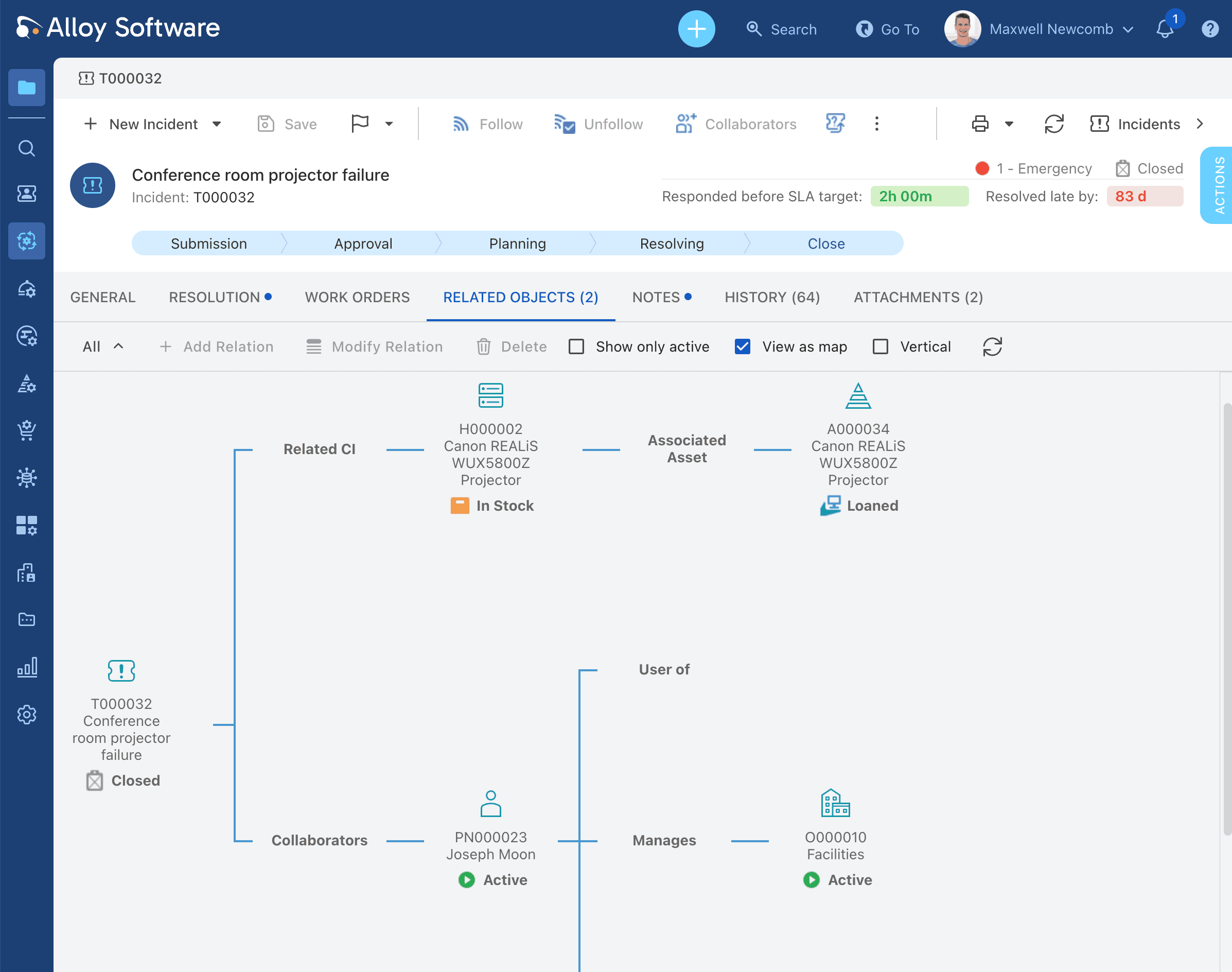
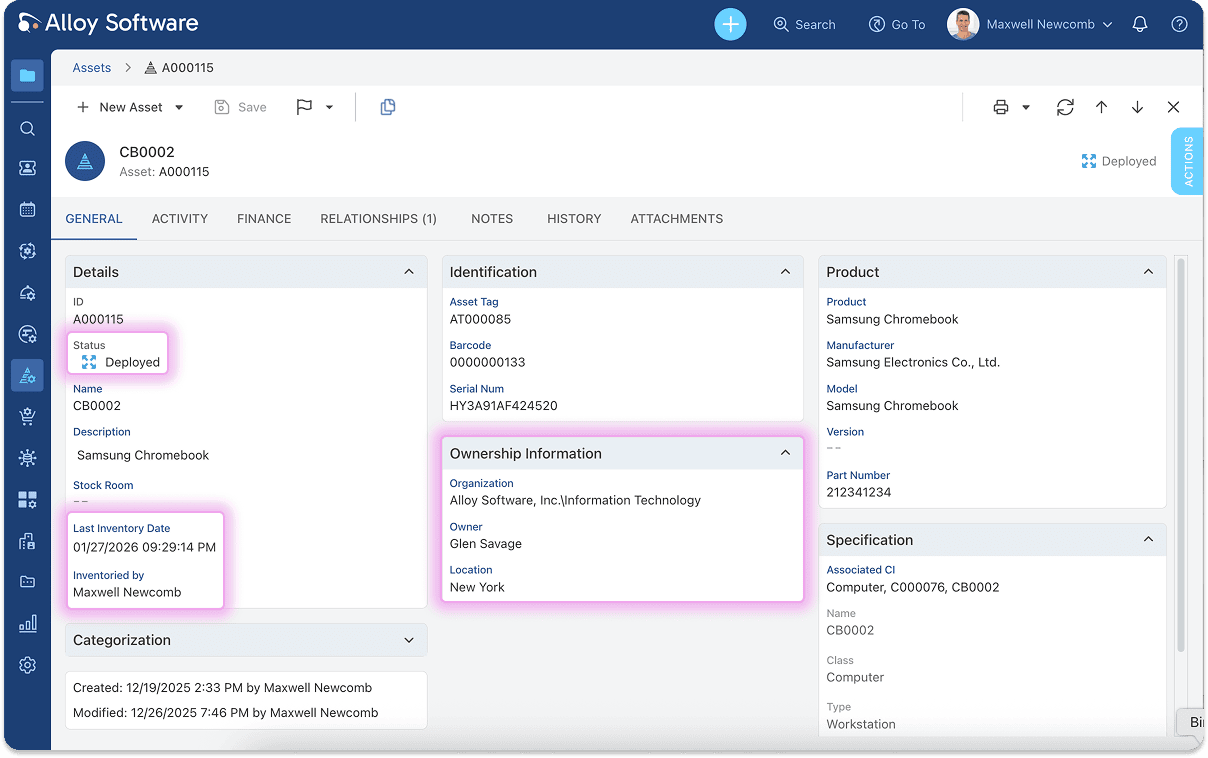
AlloyScan discovers and inventories infrastructure in depth, collecting detailed hardware, software, and configuration data across diverse environments. Alloy Navigator then links that information to asset lifecycle records, software licenses, contracts, service requests, purchasing, lending, and user relationships in a single system. This allows organizations to move beyond inventory and manage assets throughout their entire operational lifecycle.
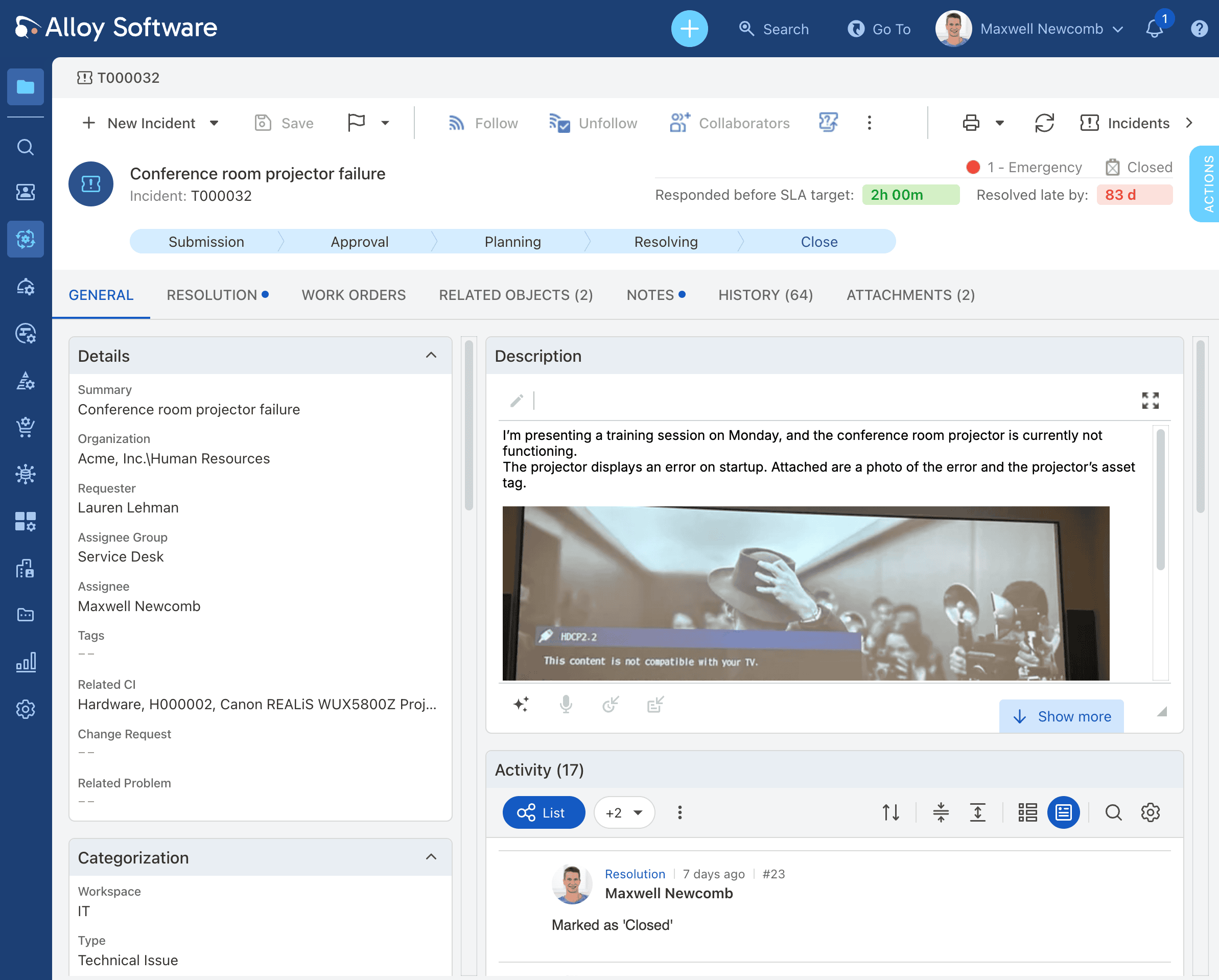
From a single incident record, technicians can see the asset, user, service history, and related configuration data needed to resolve issues efficiently.
We’re trusted by IT teams in healthcare, public sector, manufacturing, and education across 50+ countries.
Good visibility means being able to answer specific operational questions, quickly and accurately. The questions that matter most to IT teams are:
If answering these questions requires a manual investigation across spreadsheets, inboxes, audit exports, and separate tools… Well, it means that the IT asset visibility isn’t optimized and there’s room for improvement.
The connection between asset visibility and support quality is straightforward. When a ticket comes in, the technician needs to understand as much as possible about the device, the user affected. Without that context, the first few exchanges in a ticket are just gathering basic information that could have already been available.
Consider a typical scenario: a user reports that their laptop has crashed. With good asset visibility, the technician can immediately see the device model and specs, current RAM and storage, installed OS version and patch level, open and recently closed tickets for the same device, warranty status, and assigned user and location. The result is faster incident response. The technician starts diagnosing, not asking.
Together, these layers give the service desk team a full story behind a support ticket.
Every asset that is not visible is a potential vulnerability. Unknown devices cannot be patched. Unauthorized software cannot be tracked and audited. Devices running end-of-life operating systems cannot be replaced/upgraded if nobody knows they exist.
Visibility closes these gaps in several particular ways:
An organization that knows exactly what it owns and can verify its status is far better positioned for both cybersecurity and operational technology security.
Asset decisions are financial decisions. Every over-purchase, unused software license, and forgotten subscription represents money that could have been saved. Visibility makes these waste categories visible before they accumulate.
Before approving a purchase order for 30 new laptops, an IT manager with good visibility can check current stock levels, the age and condition of existing devices, which machines are assigned versus sitting in storage, and the replacement schedule for aging hardware. That check might reduce the order to 20 or reveal that a batch of recent returns is ready to redeploy.
The same principle applies to software. Flexera 2024 State of ITAM report estimates SaaS waste at around 30% of spend, meaning a $5M SaaS budget may contain $1.5M routed to unused seats, duplicated tools, and forgotten subscriptions. License reconciliation, matching what you own against what is actually installed and used, routinely surfaces significant overspend once organizations do it properly.
Over time, proper visibility turns IT cost control into an ongoing practice. Instead of discovering waste during audits or budget reviews, teams can identify it early, act on it, and defend their spending decisions with reliable asset data automation.
The same logic applies at the end of the asset lifecycle. Devices that are no longer useful still carry financial, security, and compliance implications until they are properly retired. For more guidance on handling this stage, read our guide to IT asset disposal.
Most organizations have some level of asset data. The problem is that it can be incomplete, disconnected, or too difficult to use. These are the gaps that come up most often:
Recognizing these gaps is the first step. Each one has a technical or process fix, but none of them fixes itself.

There is no single tool that delivers visibility on its own. It requires the right processes, connected to the right data, with someone responsible for keeping it current. Here is a practical sequence:
Organizations do not jump from no visibility to full visibility overnight. Most follow a recognizable progression. Understanding where you are on that curve helps prioritize the next move.
| Level | Name | What it looks like | Key next step |
| Level 1 | Manual list | Asset records live in a spreadsheet or shared document. Updates are manual and infrequent. Nobody is confident the list is complete.
Typical signs: “We think we know what we have.” |
Choose a centralized asset database and migrate existing records. |
| Level 2 | Static inventory | A formal asset database exists but is updated manually or only at audit time. The gap between the record and reality grows steadily.
Typical signs: “We have records, but they may be stale.” |
Connect an automated discovery or network inventory tool to keep records current. |
| Level 3 | Discovery + tracking | Automated discovery feeds the database. Hardware detail, software inventory, and user assignments are captured and updated regularly.
Typical signs: “We can detect assets and see recent changes.” |
Link asset records to service tickets and change requests so data is used in daily operations. |
| Level 4 | Operational visibility | Asset records are live, linked to ITSM, and actively referenced by technicians, managers, and auditors. Visibility informs decisions.
Typical signs: “Our technicians see asset context before they ask the user a single question.” |
Enable alerting, lifecycle dashboards, and license reconciliation on a regular schedule. |
| Level 5 | Proactive control | Alerts surface issues before they become incidents. Lifecycle planning, license compliance, and budget decisions are data-driven and largely automated.
Typical signs: “We act before problems happen, not after.” |
Optimize workflows, set up automated reporting, and extend visibility to cloud and SaaS assets. |
Most organizations sit at Level 2 or early Level 3. Getting to Level 4 is achievable with the right platform. The jump from there to Level 5 is mostly about workflow configuration and process discipline rather than new technology.
When evaluating tools, the question to ask is not “does this product have asset management features?” As almost every IT platform claims to. The better questions are:
Alloy Navigator and AlloyScan are built around a connected view of IT operations.
AlloyScan automatically discovers devices and collects detailed hardware, software, and configuration data across the environment. Alloy Navigator then enriches that information with business and operational context, including ownership, location, contracts, warranties, financial records, lifecycle history, and relationships between assets.
Instead of maintaining separate inventory, asset management, and service systems, organizations can work from a shared record that follows each asset throughout its lifecycle. This helps IT teams understand not only what assets they have, but also how those assets are used, supported, maintained, and governed.



IT asset visibility is not a process. It is a state your IT team is trying to reach. When the data flows correctly between discovery, inventory, service management, and lifecycle tracking, visibility is the result: a single, reliable picture of what you own, where it is, who uses it, and what is happening with it right now.
The organizations that get this right are not necessarily the ones with the most sophisticated visibility tools. They are the ones that have connected their existing data sources, assigned ownership over data quality, and made asset information accessible in the contexts where people actually need it—inside a service ticket, on a compliance report, in a budget conversation. The maturity model outlined in this article reflects a path that is available to any IT team willing to invest in the foundation.
For IT teams evaluating where to start, it would be most useful to talk with a team of experts in IT asset visibility. Here’s where Alloy Software team helps. We’ll be happy to find the setup that suits your asset visibility needs best, based on the capabilities of our solutions. Connect with our sales team today to learn more.
Connect with our sales team today to learn more about the setup that suits your asset visibility needs best.