IT Asset Disposal: A Complete Guide to ITAD Process and Best Practices
How to say good-bye to your assets in a secure and safe way.



How to say good-bye to your assets in a secure and safe way.
Modern IT organizations face mounting pressure to manage hardware retirement with the same rigor they apply to procurement. The disposal of IT assets carries security, financial, and environmental consequences that demand a deliberate program rather than ad hoc decisions.
This complete guide walks through the ITAD process from inventory to final reporting. It covers the asset lifecycle, common disposal methods, key compliance requirements, and the practices that help your team retire equipment securely while protecting asset value and the organization’s reputation.
IT asset disposal, or ITAD, is the structured asset disposal process used to retire hardware that has reached the end of its useful life. It covers every step from decommission and data sanitization through resale, recycling, or final destruction.
A robust ITAD program treats every laptop, server, hard drive, and storage device as a controlled item with a documented chain of custody. The objective is to ensure that no asset leaves the organization without verified data sanitization and complete records.
Asset disposition sits at the final phase of the asset lifecycle, yet a strong disposition plan must be defined long before equipment is retired. Mature asset management programs build disposition into the lifecycle rather than treating it as an afterthought.
Alloy Navigator, our flagman ITSM & ITAM solution, helps organizations maintain a complete lifecycle record for every IT asset, from deployment to retirement. Teams can track asset status, ownership, location, inventory history, depreciation, purchase details, warranties, and related service activity in one place.
Connected records such as lending history, financial data, and maintenance agreements help create a documented chain of custody throughout the disposal process. Historical changes remain fully traceable, supporting audit readiness, compliance reporting, and informed decisions about repair, replacement, resale, or final disposition.
If you think that Alloy Navigator might be the right fit for your needs, connect with us.


Improper disposal of IT assets creates financial, legal, and reputational exposure. A structured ITAD program reduces the risk on every front simultaneously and protects the residual asset value still locked inside aging hardware.
Retired assets often contain sensitive data: customer files, financial records, intellectual property, and employee information. Without proper data sanitization, a single discarded drive can trigger costly data breaches and serious regulatory penalty exposure under modern data protection laws.
Frameworks such as GDPR and HIPAA require documented evidence that data is gone before an asset leaves the organization. Regulatory requirements mandate certificates of destruction, formal logs, and verifiable erasure procedures throughout the process to demonstrate full regulatory compliance.
Failure to meet compliance requirements results in fines and legal action, alongside reputational damage that lingers far longer than the immediate penalty. Secure IT asset disposal is therefore not optional – it is a baseline expectation for any compliant organization handling sensitive data.
Electronic waste is the fastest-growing waste stream globally. Old laptops, servers, and peripherals contain hazardous materials such as lead, mercury, and cadmium that require careful destruction or recycling under environmental regulations to be disposed of responsibly.
Responsible disposal practices align corporate behavior with a clear commitment to environmental sustainability. Sending e-waste to certified recyclers reduces environmental impact, supports secure reuse where possible, and signals that the organization takes its sustainability obligations seriously.
Not every retired asset is worthless. Many devices retain meaningful asset value through resale or refurbishment, and a disciplined ITAD process can offset the cost of new equipment purchases substantially through resale recovery.
Tracking each asset’s residual worth requires accurate asset inventory data and a clear view of asset type, age, and condition. Without that visibility, organizations either dispose of valuable hardware too early or miss the resale window entirely.
The right moment to dispose of an asset depends on its lifecycle stage, business value, and risk profile. Common triggers include end of warranty, performance degradation, lease expiration, technology refresh cycles, and new compliance and data requirements.
Other signals include rising maintenance costs, incompatibility with current software, energy inefficiency, and security vulnerabilities that vendors no longer patch. Tracking these indicators in a central asset management system helps the team plan disposition before forced retirement creates pressure.
Getting rid of old hardware at the optimal moment ensures that residual asset value is still meaningful and that risk has not accumulated. Reactive disposal almost always destroys value and complicates compliance reporting downstream.

A repeatable disposition process turns ITAD from an ad hoc activity into a controlled program. The following five-step workflow reflects practices used across mature IT organizations in regulated industries.
Every disposition begins with a comprehensive IT asset inventory. Identify each candidate device, confirm ownership, capture serial numbers, and record asset type, location, and data sensitivity. This baseline becomes the source of truth for the entire ITAD cycle.
A formal disposition plan defines roles, timelines, approved disposal methods, and compliance checkpoints. It clarifies which assets are eligible for secure reuse, which must be recycled, and which require physical destruction to ensure proper handling at every step.
Once flagged for disposal, assets must be securely retrieved from end users, branch offices, and data center racks. Establish a documented chain of custody from collection point to staging area so every asset leaves a traceable record.
For distributed environments, schedule pickups by site and asset type. Use sealed containers, tamper-evident bags, and signed transfer logs. Any gap here undermines the integrity of every subsequent step in the asset disposal process.
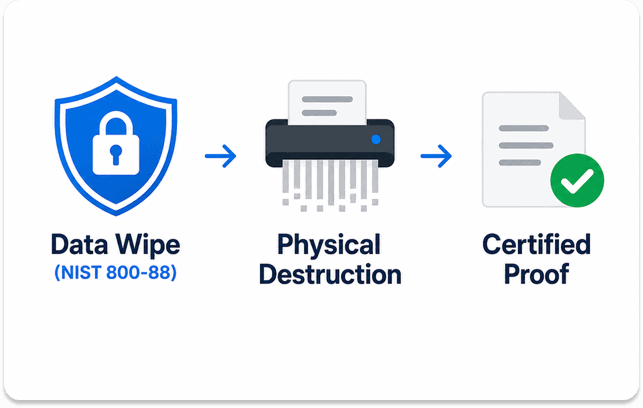
Data security depends on this step. Apply certified erasure standards such as NIST 800-88 for reusable media, and ensure hard drives are shredded when reuse is not possible or when policy requires physical destruction of the asset.
Each unit must receive a certificate confirming sanitization or destruction. These certificates of destruction, together with controlled logs, form the compliance backbone of the program and prove that no unauthorized access to sensitive data occurred during the disposition process.
After data sanitization, the asset enters its final destination path. High-value units may be resold or returned to lease vendors; functional but obsolete equipment can be donated; the rest goes to certified e-waste recyclers for responsible recycling and recovery.
Choosing a disposal method per device protects asset value while satisfying environmental obligations. Working with vendors that hold R2 or e-Stewards certification helps close the loop on accountability and ensures responsible IT asset disposal practices end to end.
Once each asset is processed, update the asset management system to reflect its final status. Attach certificates, vendor receipts, and disposition records to the corresponding entry so the audit trail is complete and instantly retrievable.
Regular reports summarize disposal activities by period, business unit, and disposal method. These reports support internal reviews, external regulatory compliance audits, and executive visibility into the organization’s ITAD performance and lifecycle outcomes.
Some organizations handle ITAD internally; others outsource to a specialized third-party partner. The right choice depends on volume, risk tolerance, internal capacity, and the certifications required by the industries served.
In-house programs offer tight control, especially in regulated environments such as healthcare and government. They demand investment in tools, training, and physical destruction equipment, and they place full accountability for compliance on internal staff and processes.
Third-party ITAD vendors bring scale, certified processes, logistics, and ready-made compliance documentation. The trade-off is dependence on the vendor’s chain of custody and the need for careful contract terms covering data security, liability, and reporting cadence.
| Factor | In-House ITAD | Third-Party ITAD |
| Control | High | Moderate |
| Cost predictability | Variable | Fixed/contracted |
| Compliance evidence | Internal logs | Vendor certificates |
| Scale flexibility | Limited | High |
| Best fit | Highly regulated, high-volume | Mid-market, distributed orgs |
Following best practices keeps the ITAD process predictable, defensible, and aligned with business goals. The recommendations below reflect proven habits across mature IT organizations and help mitigate risk throughout the asset lifecycle.
These practices must be embedded in daily operations, not pulled out only at audit time. Consistency is what transforms ITAD from a project into a defensible program that protects security and compliance year-round.
Even experienced teams make recurring mistakes during disposal. Recognizing them early helps mitigate risk and prevents small oversights from escalating into breaches, fines, or wasted asset value.
Skipping inventory accuracy. Disposing of equipment that is not properly tracked makes the audit trail incomplete and creates compliance gaps. Always verify each asset against the master asset inventory before retirement and decommission.
Relying on simple deletion. Formatting a drive does not erase data. Proper erasure or physical shredding is required to ensure data is protected and that sensitive data cannot be recovered by unauthorized parties later.
Choosing the cheapest vendor. A low-cost provider improperly vetted may save money short-term, but improper disposal exposes the organization to data breaches, regulatory exposure, and reputational harm. Certification matters more than headline price.
Ignoring environmental rules. Sending devices that contain hazardous materials to general waste violates regulations and damages the organization’s commitment to environmental sustainability. All electronic waste must be routed through certified recyclers.
Treating ITAD as a one-time event. ITAD is a continuous program tied to the broader asset lifecycle. Build it into operational routines rather than treating it as a once-a-year cleanup. Practices align best when ongoing and automated.
A reliable ITAD program rests on accurate data, controlled workflows, and complete documentation. Without a unified system, teams stitch together spreadsheets and email threads that fail every review and undermine security and compliance.
Alloy Navigator with integrated AlloyScan deliver the foundation a structured ITAD program needs:
The platform tracks each asset from purchase to final disposal method, links certificates of destruction to records, and surfaces lifecycle KPIs that drive better outcomes and financial returns.
Try Alloy Software today to see how the right asset management foundation helps your team turn IT asset disposal from a compliance burden into a controlled, value-generating program.