SolarWinds Service Desk vs Alloy Navigator: Which IT Platform Fits Your Team?
An honest, side-by-side comparison for IT managers and directors evaluating both tools — covering features, asset management depth, hosting options, and pricing model.



An honest, side-by-side comparison for IT managers and directors evaluating both tools — covering features, asset management depth, hosting options, and pricing model.
Either you’re an existing SolarWinds customer questioning whether the platform still fits your team’s needs, or a mid-market IT manager building a shortlist for the first time, you’ve landed in the right place.
Both Solarwinds Service Desk and Alloy Navigator are legitimate IT service management (ITSM) platforms — but they are built around fundamentally different operational philosophies and serve different team profiles.
SolarWinds Service Desk is a cloud-native ITSM tool that fits naturally within the broader SolarWinds monitoring ecosystem.
Alloy Navigator is an integrated ITSM + IT asset management (ITAM) platform designed for mid-market IT teams who need everything — ticketing, asset discovery, change management, and CMDB — in one place, with the option to deploy on-premises.
This comparison covers the dimensions that matter most to IT teams managing 100–1,500 endpoints:
We’ll give both products a fair hearing and help you work out which one fits your situation.
If you’re short on time, here’s the essential comparison:
| Feature | SolarWinds Service Desk | Alloy Navigator |
|---|---|---|
| Deployment | Cloud (SaaS) only | Cloud or On-premises — fully supported |
| ITSM Suite | ✓ Full ITSM (ITIL-aligned) | ✓ Full ITSM included out of the box |
| IT Asset Management (ITAM) | Add-on / additional cost | ✓ Included; no extra module required |
| Discovery & Auditing | Via SolarWinds Network Mgmt integration | ✓ Native deep audit: Windows, Linux, macOS, network devices, Chromebooks |
| Self-Service Portal | ✓ Included | ✓ Included |
| Change Management | ✓ ITIL change workflows | ✓ Configurable: graphical editor + PowerShell scripting |
| CMDB / Asset Relationships | ✓ CMDB included | ✓ Tickets linked to assets, users, locations, contracts |
| Workflow Automation | Rule-based automation | Hybrid: graphical editor + DB queries + PowerShell |
| Reporting & Dashboards | Standard + custom reports | ✓ Out-of-box, schedulable, leadership-ready |
| Pricing Model | Per technician, subscription; ITAM as add-on | Per technician: ITSM + ITAM bundled |
| HIPAA / Regulated Industry Fit | Limited (cloud-only) | ✓ On-premises for HIPAA, public sector, air-gapped networks |
| Support Model | Tiered support packages | Support treated as part of the product itself |
| Best Fit | SolarWinds ecosystem users; cloud-first teams | Mid-market IT teams needing unified ITSM + ITAM, flexible hosting |
Key product sections, Alloy Navigator:


Key product sections, SolarWinds Service Desk:


SolarWinds Service Desk (formerly Samanage) is a cloud-based ITSM platform built around ITIL-aligned processes: incident management, problem management, change management, and a self-service portal. It sits within SolarWinds’ broader portfolio of network monitoring and observability tools, which means it integrates naturally with products like SolarWinds Network Performance Monitor if you’re already running that stack.
The platform is SaaS-only; there’s no on-premises deployment option. For IT teams that live in the cloud and prioritize ease of setup with minimal infrastructure overhead, that’s a feature. For regulated industries — healthcare, public sector, aviation, energy — where data residency or air-gapped network requirements apply, it’s a constraint.
SolarWinds Service Desk is a capable, well-structured ITSM tool. Its strongest use case is organizations already invested in the SolarWinds ecosystem, or cloud-first teams where monitoring-to-ticketing integration is the primary workflow driver. Asset management and discovery capabilities are available but typically require additional licensing or integration with other SolarWinds products.
Alloy Navigator is an integrated ITSM and ITAM platform built specifically for mid-market IT teams. What differentiates it from most competitors is that ITSM and ITAM are not separate modules that require separate licenses — they are shipped together, from day one, as a single unified platform. Incident management, change management, asset discovery, software license tracking, CMDB, and the self-service portal are all included.
The Alloy Approach — the company’s internal product philosophy — is built on four principles:
Alloy Navigator is available as SaaS (cloud) or on-premises — a genuine differentiator for healthcare organizations with HIPAA obligations, public sector teams with data security policies, and industrial environments with air-gapped networks.
This is arguably the most important dimension for mid-market IT teams — and where the two products diverge most sharply.
SolarWinds Service Desk includes a basic asset register and ties into the broader SolarWinds discovery toolset. For teams already running SolarWinds network monitoring, the integration is straightforward. For teams that aren’t, asset discovery requires additional tooling and licensing outside the Service Desk product itself.
Alloy Navigator includes native asset discovery as a core, bundled feature. Its audit engine covers Windows, Linux, macOS, network devices, and Chromebooks. The approach is explicitly exhaustive: every discoverable data point is captured — hardware specifications, registry contents, BIOS values, connected peripherals, installed software, license status. The IT team decides which fields to surface. This is not a feature you unlock later; it’s live from deployment.


The pricing structure makes this contrast concrete. SolarWinds Service Desk requires the Advanced tier ($79/technician/month) to unlock Network Discovery, License Compliance, and Contract Management — none of these are available on the $39 Essentials plan. Alloy Navigator includes Network Discovery and Asset Management from its entry-level Explorer plan at $19/technician/month.
For IT teams where asset tracking is a compliance or audit requirement — healthcare, manufacturing, energy, public sector — the depth of Alloy’s native discovery matters significantly more than convenience integrations.
Verdict
Alloy Navigator for teams where ITAM is a core requirement. SolarWinds Service Desk if you’re already in the SolarWinds ecosystem and asset management is secondary.
Both platforms offer a complete help desk experience: ticket creation, routing, assignments, priority management, SLA tracking, and a self-service portal for end users.
SolarWinds Service Desk delivers a clean, modern interface with good out-of-box ITIL structure. For teams that want a polished, immediately usable ticketing system with minimal configuration, it delivers.
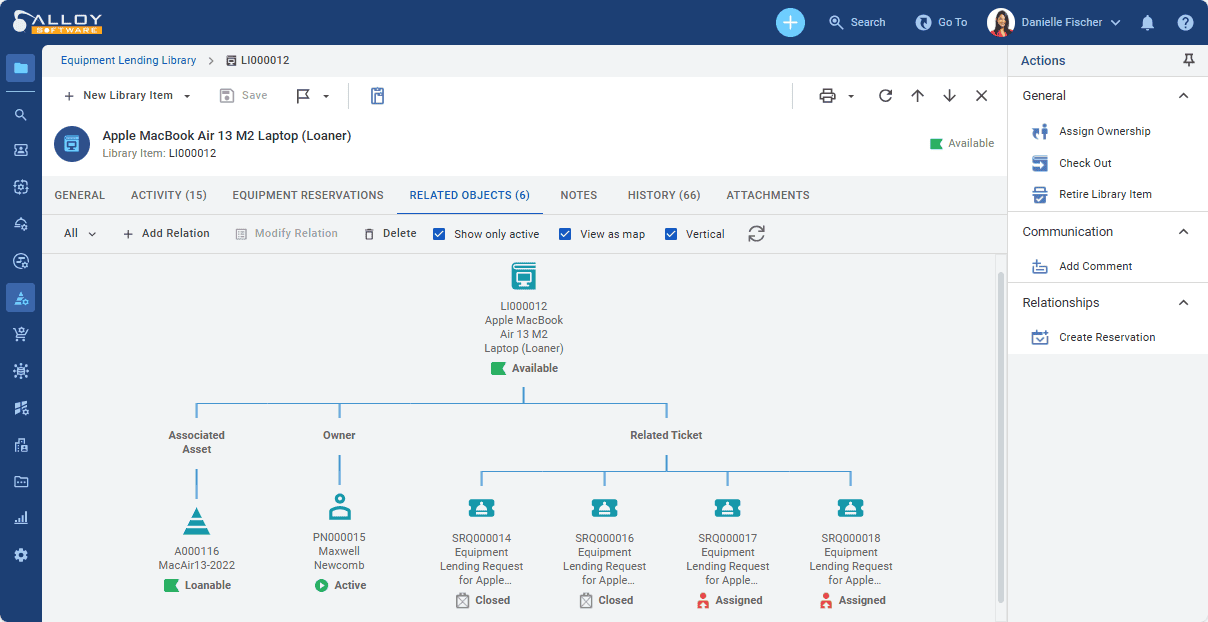
Alloy Navigator’s ticketing goes one step further in its native integration with asset data. Tickets are linked to assets, users, locations, and contracts from within the same platform — no external integration required. For an IT manager troubleshooting a recurring issue, being able to see the full asset history, open changes, and linked tickets in one view is a material time saving. The self-service portal includes knowledge base integration and configurable service catalogs.


Verdict
Both are capable. Alloy Navigator edges ahead for teams that need ticket-to-asset relationships as a default, not a configuration project.
SolarWinds Service Desk offers ITIL-compliant change management with approval workflows, CAB support, and change scheduling. For teams that follow ITIL practices closely, the structure is well-implemented and familiar.
Alloy Navigator offers what its team describes as a hybrid approach: simple operations are handled through a pseudo-graphical workflow editor — drag-and-drop-style, low barrier to entry. Complex operations — multi-step approvals with database lookups, PowerShell script execution, external API calls — are also possible. The ceiling is meaningfully higher than tools that limit workflow logic to visual rule-builders.
This matters for IT teams in regulated environments where change management processes are not generic ITIL templates but organization-specific audit trails with documented approval chains, risk assessments, and rollback procedures. Alloy can accommodate that complexity without requiring a developer.
Verdict
SolarWinds for standard ITIL change workflows. Alloy Navigator for teams that need configurable, organization-specific change processes beyond ITIL templates.
SolarWinds Service Desk includes a solid reporting engine with pre-built and custom report options, covering ticket volumes, SLA performance, technician workload, and asset status. Dashboards are configurable and reasonably accessible for non-technical stakeholders.
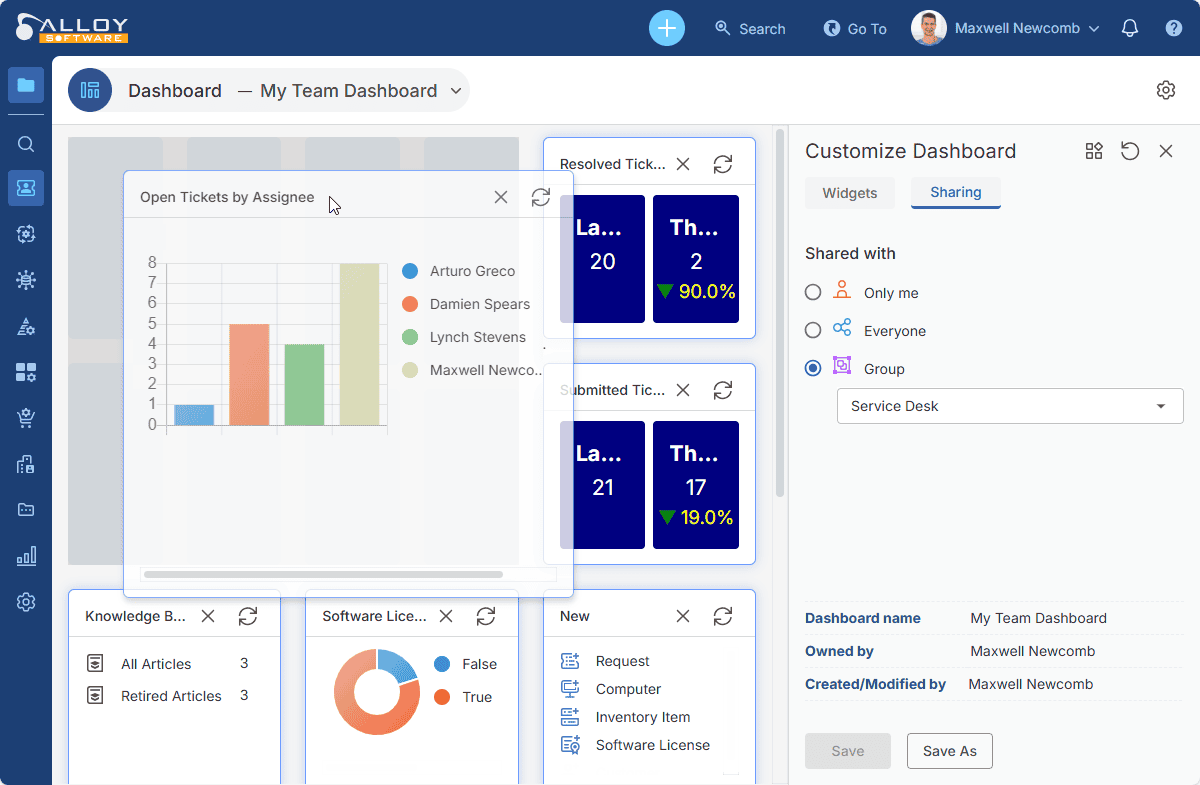
Alloy Navigator’s reporting is built with leadership visibility in mind. Out-of-box dashboards are shareable, exportable, and designed to answer the questions IT directors and CIOs regularly face: asset lifecycle status, license compliance exposure, open ticket aging, change success rates, workload by team. For IT managers who need to justify headcount, demonstrate SLA compliance, or prepare for an internal audit, the reporting layer is a material advantage.


Verdict
Both are functional. Alloy Navigator’s out-of-box reporting depth is better suited to the compliance and leadership-reporting use cases common in regulated industries.
SolarWinds Service Desk includes CMDB functionality that maps configuration items and their relationships. The integration with SolarWinds’ network discovery tools provides good infrastructure context for teams in that ecosystem.
Alloy Navigator’s CMDB is tightly woven into the broader platform: assets are related to the tickets raised against them, the users who own them, the locations they sit in, the contracts that cover them, and the changes that have been applied. This relational model means that when a ticket comes in, the technician has full context. Not just a device record, but a living picture of that asset’s history and current state.
Verdict
Alloy Navigator is more suitable for organizations where the CMDB needs to be a live operational tool, not just an infrastructure map.
SolarWinds is a large vendor with a broad portfolio, where ITSM is just one of many priorities. Alloy Software, in contrast, is a privately held, owner-operated company focused specifically on ITSM and ITAM. Choose a focused platform with consistent direction.
This is a binary differentiator. SolarWinds Service Desk is cloud-only. There is no on-premises deployment path. At the same time, it is worth noting that SolarWinds offers a similar product for on-premises deployment: SolarWinds Web Help Desk.
For the majority of IT teams, cloud deployment is fine — and often preferable. Smaller teams with 1–5 technicians frequently prefer SaaS specifically to avoid the overhead of hosting and maintaining an on-premises server.
However, some still require or strongly prefer on-premises deployment. The reasons are consistent: HIPAA compliance requirements in healthcare, data security policies in public sector and government, air-gapped network environments in aviation and energy, and sovereignty requirements in some international jurisdictions.
If your organization falls into any of these categories, Alloy Navigator is a better option. Alloy Navigator supports both cloud andon-premises deployment, with both paths fully maintained and supported.
Verdict
If on-premises deployment is a hard requirement, Alloy Navigator is the clear choice. SolarWinds Service Desk does not offer this option.
SolarWinds Service Desk is priced per technician on a subscription basis. Advanced ITAM features and discovery capabilities may require additional licensing, either through the Service Desk tier or through complementary SolarWinds products.
Alloy Navigator is priced per technician with ITSM and ITAM bundled — no separate asset management module to purchase. Annual investment typically ranges from around $1,000–$3,500 for small teams (1–4 technicians), $3,500–$7,500 for mid-market teams (5–10 technicians), and $7,500–$25,000+ for larger deployments. The positioning is clear: enterprise-grade ITSM+ITAM capability at a price point accessible to mid-market organizations, without the ServiceNow price tag.
The total cost of ownership picture also includes support. When support is a separate contracted tier, the TCO calculation extends beyond license fees. Alloy’s approach of treating support as a core product element, not a billable service tier, changes that calculation for organizations that expect real responsiveness.
Verdict
Both are competitive at the mid-market price point. Alloy Navigator’s bundling of ITAM avoids the incremental licensing creep common with modular ITSM tools.
SolarWinds Service Desk structures its support across three tiers — Essentials ($39/technician/month), Advanced ($79), and Premier ($99) — with live chat support included at the entry level, and phone and email access from a Customer Success Team only available from the Advanced tier upward.
Alloy Navigator takes a different approach: regardless of which plan you’re on — Explorer, Express, or Enterprise — the support experience doesn’t change. Every customer accesses the same support portal and works with the same team. There are no priority queues unlocked by spending more. Alloy also places significant weight on customer feedback — a large share of the improvements shipped in each release trace directly back to requests and observations submitted through support.”
Alex Oliva, IT Director at Makita USA, noted that he chose Alloy Navigator: “partly because the support agent who helped the company with presales calls was a good example of expert-level phone support.”
For mid-market buyers who are burned by enterprise vendors with slow support SLAs, this is a meaningful differentiator.
Verdict
Alloy Navigator’s support-as-product philosophy is a meaningful advantage for small-to-mid IT teams who have experienced poor vendor support with previous tools.
The right choice depends on your operational context — specifically your hosting requirements, asset management depth, and where your team sits today. Here’s a direct framework:
Choose SolarWinds Service Desk if:
|
Choose Alloy Navigator if:
|
Alloy Navigator is deployed across healthcare, manufacturing, public sector, education, and technology organizations globally. A few examples relevant to teams evaluating this comparison:
“I was doing research on help desk systems and came across Alloy Software. Partly because of the easy user interface, partly because the support agent who helped with presales calls was a good example of expert-level phone support.”
— Alex Oliva, IT Director, Makita USA (Manufacturing)
North Cumbria Integrated Care NHS Foundation Trust (Healthcare, UK) — A 6,500-employee NHS trust responsible for over 70 services across 15 locations deployed Alloy Navigator to manage IT service delivery during COVID-19. The on-premises deployment option was essential given NHS data security requirements.
Blitz Games Studios (Technology, UK) — One of the UK’s top 5 independent game developers implemented Alloy Navigator to manage ITAM and software licensing compliance across a rapidly growing infrastructure. Key benefits included accurate network inventory, license compliance tracking, and quick data retrieval for audits.
Energy sector customer (replaced SolarWinds Service Desk) — An energy organization moved from SolarWinds to Alloy Navigator, driven by the need for deeper ITAM capabilities and on-premises deployment for compliance with industry security requirements.
We won’t quote specific figures here — pricing changes and depends heavily on team size, hosting preference, and contract terms. What we can offer is a structural comparison that helps you set expectations:
| Dimension | SolarWinds Service Desk | Alloy Navigator |
|---|---|---|
| Pricing unit | Per technician | Per technician |
| ITAM in base price | No — typically add-on | Yes — bundled |
| Discovery in base price | Requires additional SolarWinds product | Yes — native, bundled |
| Small team (1–4 techs) | Contact vendor | ~$1,000–$3,500/year |
| Mid-market (5–10 techs) | Contact vendor | ~$3,500–$7,500/year |
| Enterprise-lite (10–35 techs) | Contact vendor | ~$7,500–$25,000+/year |
| On-premises option | Not available | Available (may affect pricing) |
For a custom quote based on your team size, endpoints, and hosting preference, visit Alloy’s pricing page or speak to the sales team.
SolarWinds Service Desk includes basic asset management functionality and integrates with other SolarWinds products for network discovery. However, deep ITAM capabilities — automated multi-platform discovery, software license tracking, hardware lifecycle management — typically require additional SolarWinds products or add-on licensing. For teams where ITAM is a primary requirement rather than a secondary consideration, a purpose-built ITSM+ITAM platform like Alloy Navigator may offer a more complete out-of-box experience.
Yes. Alloy Navigator supports both cloud (SaaS) and on-premises deployment, with both options fully maintained and supported. On-premises deployment is a genuine operational necessity for healthcare organizations with HIPAA obligations, government and public sector teams with data sovereignty requirements, and industrial environments with air-gapped networks. Approximately 40% of Alloy’s customers deploy on-premises for exactly these reasons.
Both are priced per user (technician) on a subscription basis. The key structural difference is that Alloy Navigator bundles ITSM and ITAM in a single price, while SolarWinds Service Desk may require additional licensing for advanced asset management and discovery features. For mid-market teams of 1–35 technicians, Alloy Navigator’s annual investment typically ranges from $1,000 to $25,000+, depending on team size. Contact both vendors for current pricing specific to your configuration.
Yes, and this is a documented pattern in Alloy’s customer base. Healthcare and public sector organizations frequently choose Alloy Navigator specifically because it offers on-premises deployment — a requirement that SolarWinds Service Desk cannot meet as a cloud-only platform. North Cumbria NHS (UK) is one example of a healthcare organization running Alloy Navigator in a regulated, on-premises environment.
The three most material differences are: (1) Hosting — SolarWinds is cloud-only; Alloy Navigator supports both cloud and on-premises. (2) ITAM integration — Alloy bundles ITSM and ITAM natively; SolarWinds treats ITAM as an additional component. (3) Target ecosystem — SolarWinds Service Desk is strongest for teams already running SolarWinds monitoring tools; Alloy Navigator is purpose-built for mid-market IT teams that need a unified platform regardless of their existing stack.
For small IT teams (1–5 technicians), both tools are viable at entry-level pricing. The decision typically hinges on two factors: hosting requirement and ITAM need. If your team needs on-premises deployment or requires native asset discovery and lifecycle management bundled with ticketing, Alloy Navigator is the stronger fit. If you are cloud-first and primarily need clean, ITIL-structured ticketing with minimal setup, SolarWinds Service Desk is a reasonable option — particularly if you’re already in the SolarWinds ecosystem.
We’re trusted by IT teams in healthcare, public sector, manufacturing, and education across 50+ countries.
→ Book a 15-minute demo tailored to your team size and industry